

How do you keep up with the news? More importantly, how do you track everything happening in cyber threat intelligence without feeling completely overwhelmed by the firehose of information? This is where you need a CTI aggregator.
Between vendor blogs, government alerts, and security news sites, it’s a full-time job just to keep your head above water. This constant flood of data leads to burnout and, even worse, missed threats. This article is your chance to get organized. You will see how you can build your own CTI aggregator for free.
You will learn why you need one, be shown exactly how to set it up using a free tool, and receive a curated list of sources to get started. Get ready to turn information chaos into a streamlined, actionable intelligence feed!
What is a CTI Aggregator?
Think of a cyber threat intelligence (CTI) aggregator like a personalized, high-tech newspaper for cyber defenders. Instead of collecting articles about sports or celebrities, it gathers intelligence specific to the cyber threats that could impact your organization.
It’s your one-stop shop for situational awareness in the digital world, transforming the daily firehose of security blogs, government alerts, and research papers into a single, manageable feed. It brings order to the chaos, allowing you to stop chasing information and start analyzing it.
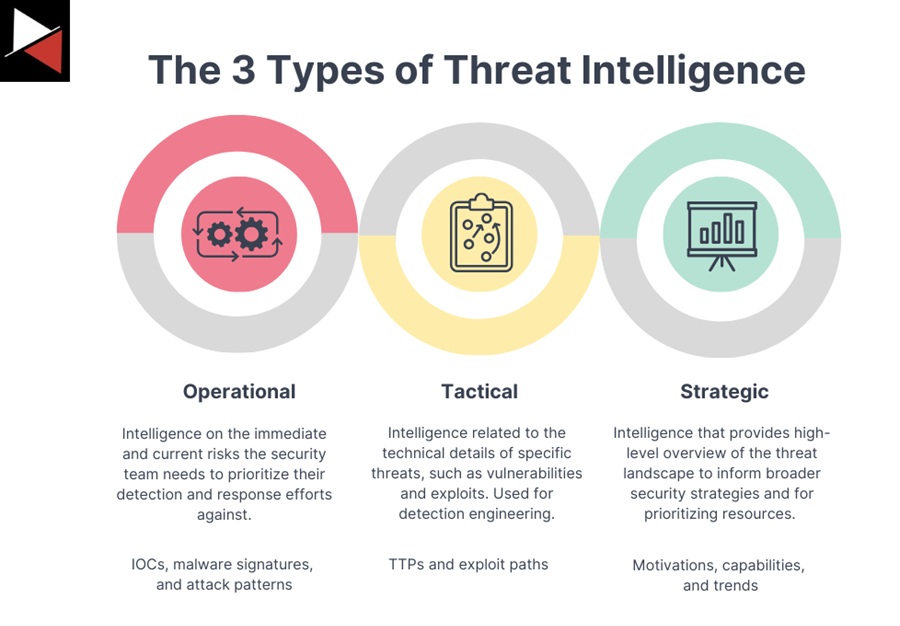
A well-built CTI aggregator can pull in and help you filter information at every level of intelligence.
Tactical Intelligence
This is the ground-level, immediately actionable data. Think Indicators of Compromise (IOCs) like malicious IP addresses, domains, or file hashes. For example, a tactical feed might provide a list of command-and-control servers used by a new malware variant. You can take this data and immediately hunt for threats on your network or plug it into your firewall for blocking.
Operational Intelligence
This intelligence focuses on the adversary’s playbook—their tactics, techniques, and procedures (TTPs). It helps you understand the “how” behind an attack. An operational report might detail how a specific ransomware group is exploiting a new vulnerability in a popular software to gain initial access. This allows defenders to move beyond just blocking IOCs and start building detections for the malicious behaviors themselves.
Strategic Intelligence
This is the 30,000-foot view that informs long-term planning and decision-making for leadership. Strategic intelligence examines high-level trends, such as shifts in the ransomware landscape, the geopolitical motivations behind specific cyber attacks, or which industries are being targeted the most. It answers the “why” and helps a CISO decide where to invest security resources over the next year.
All of this in a “single pane of glass.”
Single Pane of Glass
In the world of cyber security, there’s a crucial concept called the “single pane of glass.” The goal is to have one central platform for all your alerts, data, and intelligence.
But why?
Every time you switch contexts—from a browser tab to a PDF to an email—your brain loses a bit of focus and momentum due to something called “attention residue,” where thoughts about the previous task linger and interfere with the new one. This mental friction saps energy and introduces delays.
Imagine an analyst with 15 different browser tabs open. They’re trying to cross-reference a technical vendor blog, a dense government PDF alert, and unverified adversary chatter from a Telegram channel.
The constant switching makes it stressful, inefficient, and incredibly easy to miss a critical connection between two seemingly unrelated pieces of data. This is how attackers slip through the cracks.
A CTI aggregator solves this by putting all that information into one place. An analyst can see an IOC in one report and immediately pivot to see if it’s mentioned in another source, all without leaving the interface. This fusion of information allows you to spot patterns and connect the dots effortlessly. It’s a fundamental part of a good threat intelligence lifecycle.
A CTI aggregator isn’t just about convenience; it’s about reducing cognitive load and improving performance.
Tools Available for a CTI Aggregator
So, how do you get your hands on a CTI aggregator? You have two main options, each suited for different needs and budgets.
First, you could buy a subscription to a commercial Threat Intelligence Platform (TIP). These are incredibly powerful, enterprise-grade tools designed for mature security operations. They go far beyond simple aggregation, offering features such as automated indicator enrichment, risk scoring, and deep integrations with other security tools, including SIEMs and SOAR platforms.
However, this power comes with a hefty price tag, often requiring significant annual budgets that put them out of reach for many.
The second option? Build your own for free. You can create a surprisingly powerful and highly customized platform using popular newsreader apps. This approach democratizes threat intelligence, making it accessible to students, small businesses, and individual analysts who don’t have a six-figure budget.
While it requires more manual setup, the trade-off is complete control and zero cost. Two of the best tools for this are Inoreader and Feedly. For this guide, you will learn how to build a CTI aggregator using Inoreader.
To learn how to build a CTI aggregator using Feedly, check out this article.
Inoreader Demo
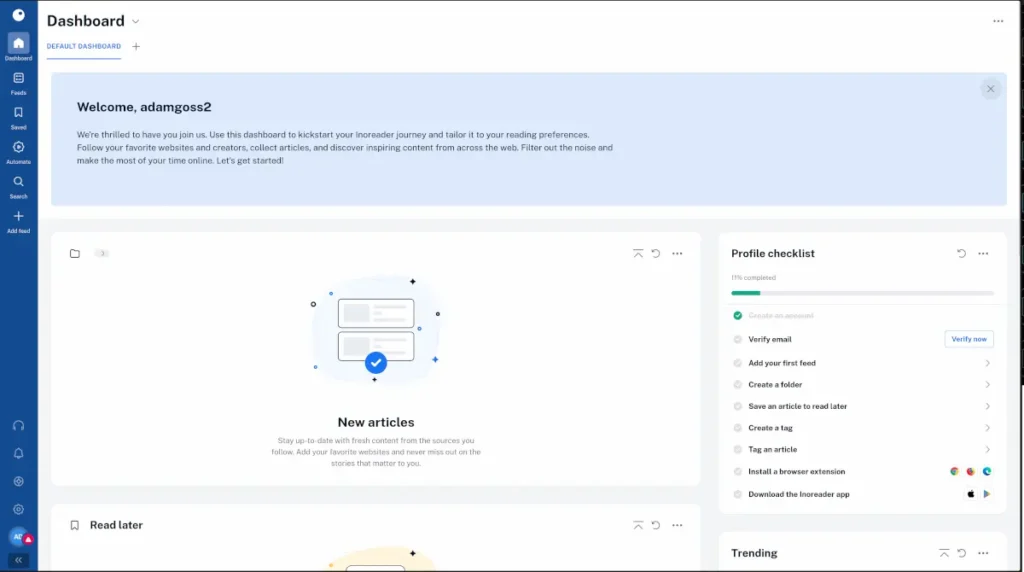
Alright, let’s get our hands dirty and build our CTI aggregator. This is where the theory stops and the practical application begins. First, head over to Inoreader.com and create a free account. Once you log in, you’ll be greeted with a clean, empty dashboard—this is our blank canvas.
Step 1: Create Your First Folder
Before you start adding sources, you need to get organized. Think of this like setting up a filing cabinet before you start receiving documents. It’s a critical first step that will save you from chaos later on.
In the left-hand menu, click the plus sign next to “Feeds” (1) and select “New folder” (2).
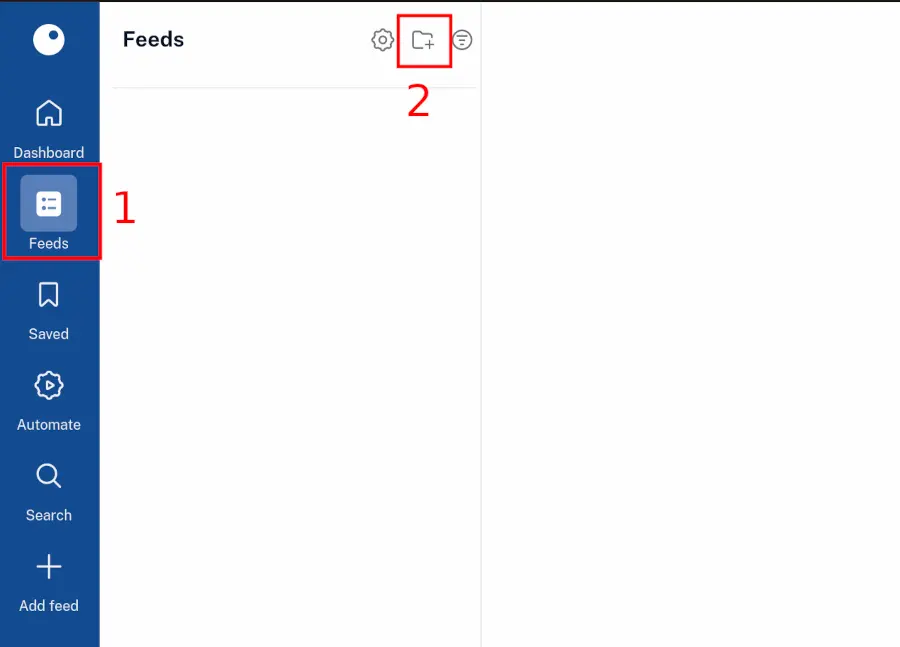
Let’s give it a meaningful name. Since this will be your primary source of daily intelligence, let’s name it “Daily CTI Checks.” Add any feed you’d like and click the Save folder button.
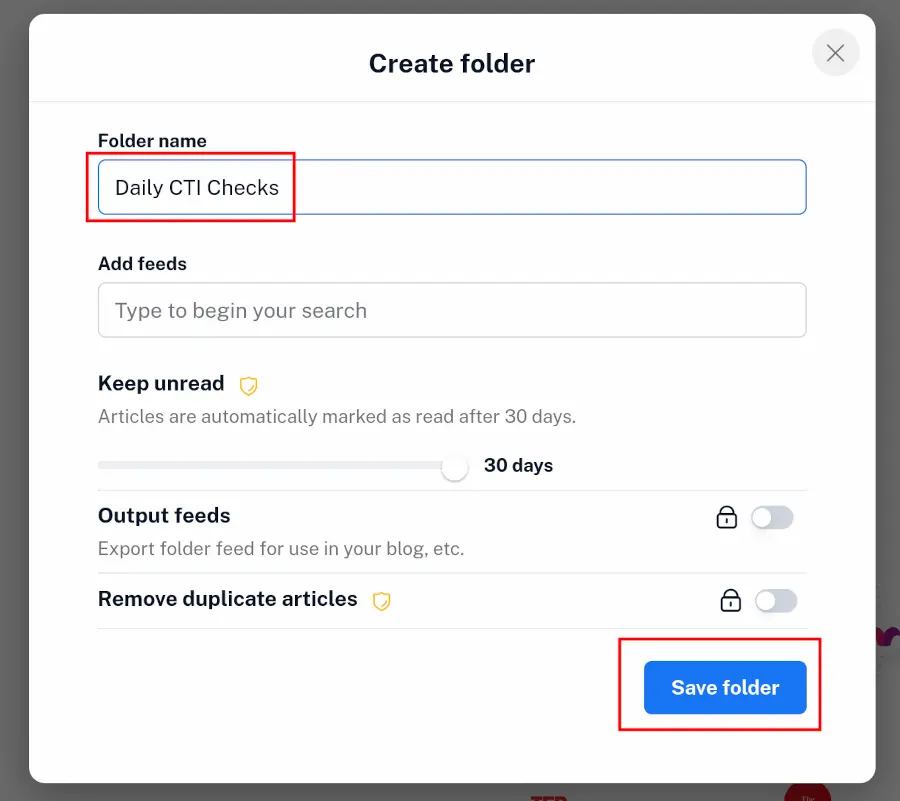
This simple action lays the foundation for a structured and efficient workflow.
Step 2: Add Your First Intelligence Feed
Now for the fun part. Let’s add our first source. BleepingComputer is a great source to get started with; it is a fantastic site for cyber security news.
Click the plus sign in the top-left menu again, and then select “Feed” (1).
A search bar will appear. This is your gateway to finding sources. Type “Bleeping Computer” into the bar (2).
As you type, Inoreader will search for matching RSS feeds. You’ll see the official Bleeping Computer feed appear in the results. Click on it (3).
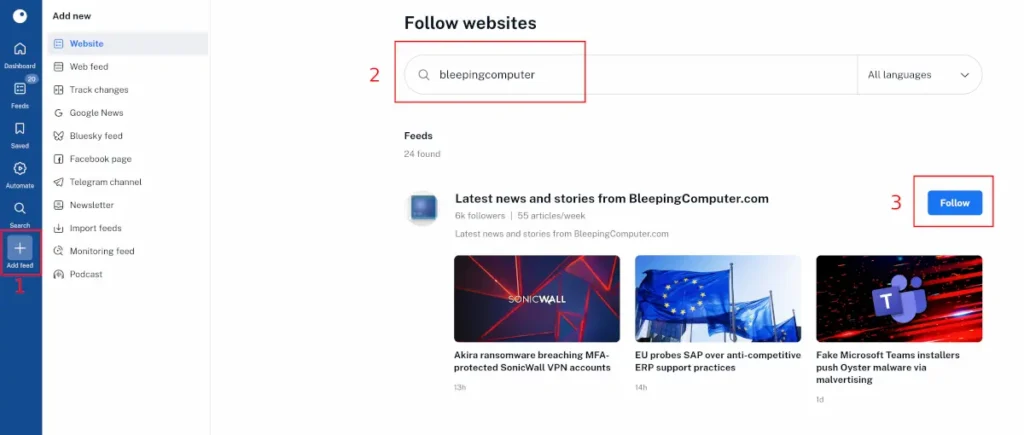
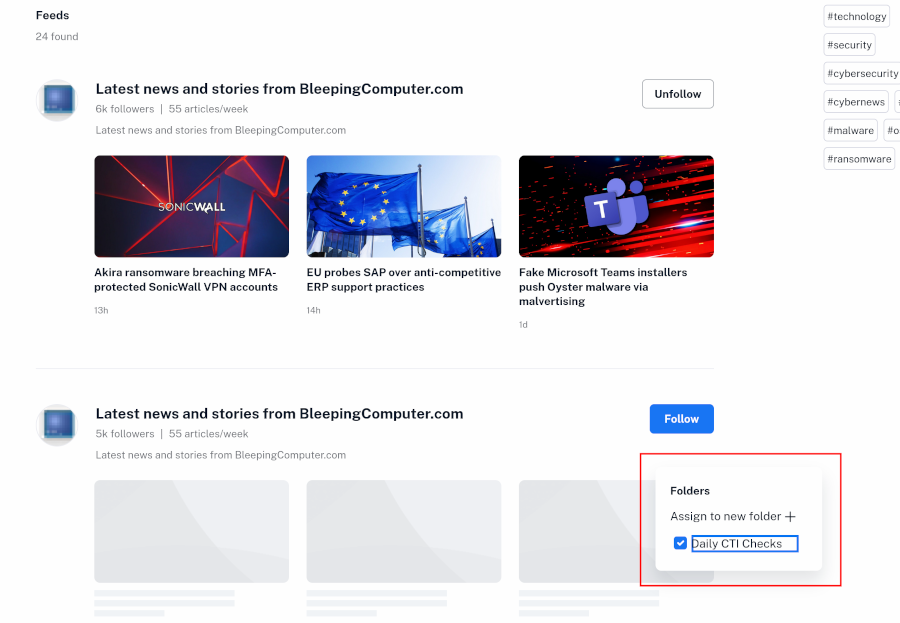
A confirmation box will pop up. Click the big blue “Follow” button.
Crucially, Inoreader will ask you where to save it. Click on the pop-up that says “Add to folders” after you click Follow.
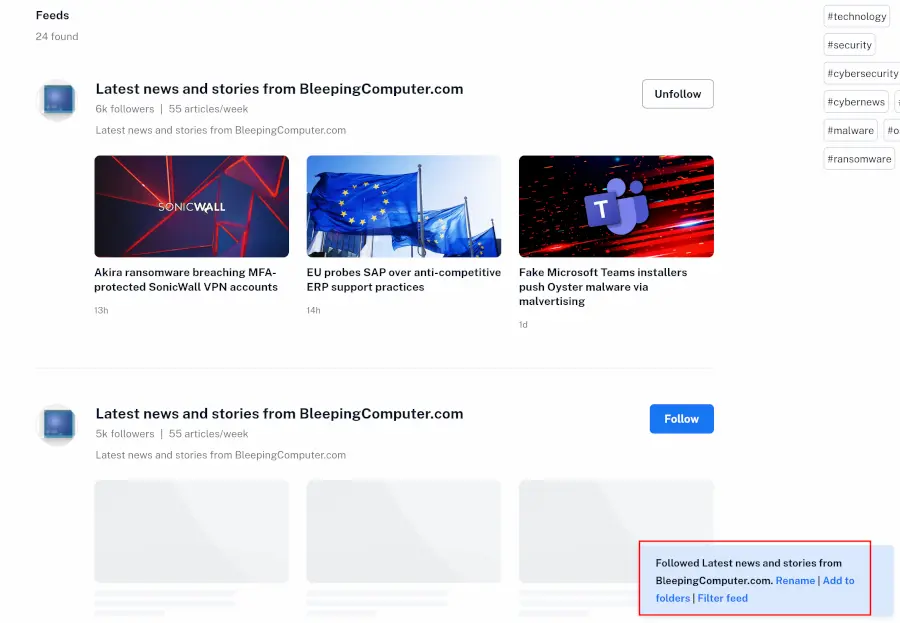
Then, make sure you select your newly created “Daily CTI Checks” folder.
Step 3: See the Magic Happen
The moment you add the feed, your dashboard comes to life. It will immediately populate with the latest articles from Bleeping Computer, all neatly organized.
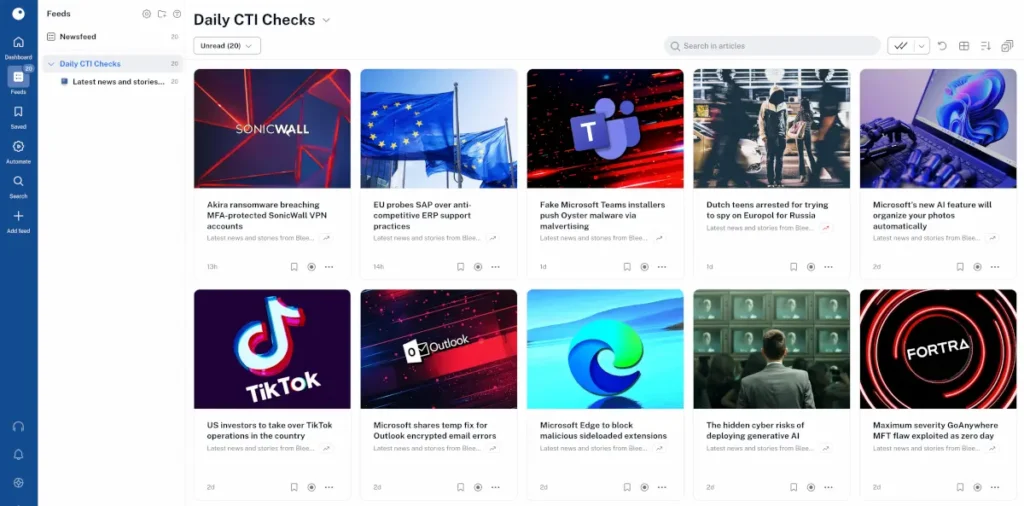
You’ve just taken your first step toward that “single pane of glass.” No more manually visiting the website; the intelligence now comes directly to you.
You can click on any article title to see a summary, or often the full text, directly within the Inoreader interface. This is perfect for quick triage—you can scan headlines and summaries to decide what’s worth a deeper look.
If an article is particularly interesting, you have the option to open it in a new browser tab for the whole experience. This simple, streamlined process is the core of what makes a CTI aggregator so powerful.
Now that you have your CTI aggregator up and running, you will want to add some good CTI sources to it!
CTI Sources to Add
To add more sources, you just need their RSS feed link. An RSS feed is a simple, standardized web link that lets tools like Inoreader know when a new article has been published. A great CTI aggregator utilizes a combination of various threat intelligence sources to provide a comprehensive view of the threat landscape.
A blend is crucial because each source type offers a unique perspective. I recommend starting with:
- Top-Tier Security Vendors: Blogs from companies like CrowdStrike, Mandiant (Google), and Palo Alto Networks’ Unit 42 are your source for deep-dive technical analysis. These teams are on the front lines of incident response, so their blogs are often the first place you’ll find detailed breakdowns of new malware families or in-depth profiles of state-sponsored threat actors. Their content is fantastic for operational-level intelligence.
- Government Agencies: Alerts from agencies like the US Cybersecurity and Infrastructure Security Agency (CISA) or the UK’s NCSC are authoritative, high-signal, and timely. When a critical vulnerability is being actively exploited, these agencies are often the first to issue official guidance. Their advisories are must-reads for tactical intelligence and understanding what threats have the highest national impact.
- Independent Researchers: The personal blogs of individual researchers are where you’ll often find the most cutting-edge, innovative work. These are the individuals who reverse-engineer malware on their own time or discover novel attack techniques before they become mainstream. Following them provides a raw, unfiltered look into the future of cyber threats.
Here is a list of free and open-source CTI feeds to add to your CTI aggregator tool:
- Mandiant
- Sekioa.io
- AlienVault OTX
- CISA Alerts
- Cisco Talos Blog
- Cyble Research Blog
- IBM X-Force Exchange
- Microsoft Security Intelligence
- NCSC Weekly Threat Reports
- Red Canary Blog
- RiskIQ Community Edition
- Trend Micro Research Blog
- Palo Alto Networks Unit 42 Blog
But wait, how do you organize all these feeds?
Organizing Feeds Using Folders
As a pro tip, don’t just dump all your sources into one giant, unsorted bucket. That just recreates the information overload problem you are trying to solve. Use the folders feature to categorize your feeds. This transforms your aggregator from a firehose of data into an organized, queryable library.
For example, if your manager asks for a quick briefing on the latest ransomware TTPs, you don’t want to be scrolling through hundreds of unrelated articles. Instead, you can simply click on your “Ransomware News” folder and have all the relevant intelligence instantly available.
You could create folders for:
- Ransomware News
- Vulnerability Disclosures
- Cloud Security
- Threat Actor Tracking (e.g., separating feeds that focus on Russian vs. Chinese actors)
- Industry-Specific Threats (e.g., Financial Sector or Healthcare)
This structured approach is the foundation of a solid collection management framework. It allows you to tailor your intelligence consumption to your specific tasks, making your analysis faster, more focused, and ultimately more effective.




Summary
Building your own CTI aggregator is one of the highest-value things you can do to make your intelligence gathering faster, smarter, and more efficient. It brings everything into that single pane of glass, saving you from the tedious, manual task of checking dozens of websites every day.
This frees you up to spend your time on what truly matters: analyzing information and figuring out how to act on it to protect your organization. It moves you from being a simple data collector to a true data analyst.
For your homework, select a tool like Inoreader, add 5-10 of your favorite sources, and begin building your own personal threat feed. You’ll be amazed at how quickly it becomes an indispensable part of your day. Good luck!
Frequently Asked Questions
What Is an RSS Feed?
An RSS (Really Simple Syndication) feed is a web format used to publish frequently updated works—such as blog entries or news headlines. A CTI aggregator uses these feeds to automatically pull in the latest articles from your chosen sources as soon as they are published, eliminating the need to visit each site manually.
How Is a CTI Aggregator Different From a Threat Intelligence Platform (TIP)?
While both aggregate data, a TIP is a much more complex and expensive commercial solution that often includes features like automated indicator enrichment, risk scoring, and integrations with other security tools. A DIY CTI aggregator, as described here, is a free, lightweight solution that centralizes and organizes open-source intelligence feeds for manual review and analysis.
How Many Sources Should I Add to My CTI Aggregator?
It’s best to start small and grow. Begin with 5-10 high-quality, trusted sources that are relevant to your industry or areas of interest. You can always add more later. The goal is to get a manageable, high-signal feed, not to recreate the overwhelming firehose you’re trying to escape.
Can I Use a CTI Aggregator to Track Threats to My Specific Industry?
Absolutely. Many security vendors and research groups publish industry-specific threat intelligence. You can create a dedicated folder in your CTI aggregator (e.g., “Financial Sector Threats” or “Healthcare Cyber Attacks”) and populate it with feeds that focus on your area, creating a highly customized intelligence view.