

Are you drowning in a sea of security threats? For many cyber threat intelligence analysts, the daily reality is a relentless firehose of data from dozens of disconnected sources, making it nearly impossible to distinguish a real threat from benign background noise. This is where a threat intelligence platform can save the day!
This guide will break down everything you need to know about these essential tools. We’ll explore what a threat intelligence platform is, the various types available, and how to select the ideal one for your organization.
We will also examine the key features you need to evaluate and a selection process you can use to ensure you make the right decision. Let’s dive in!
Want to listen on the go? Check out this article in podcast form!
What is a Threat Intelligence Platform?
Think of a threat intelligence platform (TIP) as the central nervous system for your cyber threat intelligence (CTI) team. It’s a hub designed to excel in one area: managing the complete lifecycle of threat intelligence.
Much like a brain, a TIP ingests a constant stream of sensory input from countless sources, processes it to understand what’s important, and sends clear, coordinated signals for action to the CTI team.

It continuously collects, aggregates, and organizes threat data from various internal and external sources. This isn’t just a handful of static Indicator of Compromise (IOC) feeds; it can include:
- Commercial threat feeds provide curated lists of malicious domains
- Open-source intelligence (OSINT) gathered from public forums like GitHub and Pastebin
- Intelligence from chatter on clandestine dark web marketplaces
- Data from industry sharing groups (ISACs)
- And more!
All of this data is correlated in real-time with your own internal security logs and incident reports. Without a TIP, managing this volume and variety of data is a monumental, if not impossible, manual task.
To learn more about the various data sources used for cyber threat intelligence, check out this article on Essential Threat Intelligence Collection Sources You Need to Know.
But a threat intelligence platform doesn’t just hoard data; its true value lies in how it processes and analyzes this information, turning a chaotic mess of raw data points into a coherent, understandable narrative. This is where the real magic happens!
These platforms enrich this data with layers of crucial context, transforming a standalone, meaningless string of numbers into information your team can analyze to produce intelligence.
For example, a TIP can reveal that a once-trivial IP address is actually a command-and-control (C2) server for a specific ransomware group, such as Conti, complete with its geographic location, hosting provider, and a history of its use in past campaigns. It does this by correlating disparate data points to identify hidden patterns and to help you connect the dots through valuable context.

This process of automated enrichment and correlation ultimately transforms a deafening roar of low-value noise into a handful of high-fidelity, actionable leads relevant to your organization. The result is a fundamental shift in how CTI teams operate.
Instead of sifting through thousands of vague intelligence leads, they can focus their efforts on a small number of threats relevant to their organization that require prioritization and attention. This filtering can be customized to match your organization’s Priority Intelligence Requirements (PIRs).
Automation, correlation, and enrichment do the bulk of the work in transforming data into information, enabling CTI analysts to concentrate on the analysis phase of the CTI lifecycle.
So, what do these threat intelligence platforms look like?
Types of Threat Intelligence Platforms
Threat intelligence platforms are not a one-size-fits-all solution, and which one you pick will have significant implications for your CTI team and the wider business’s security operations.
The landscape is diverse, but platforms generally fall into two main categories, each with distinct philosophies, benefits, and trade-offs.
Vendor Platforms
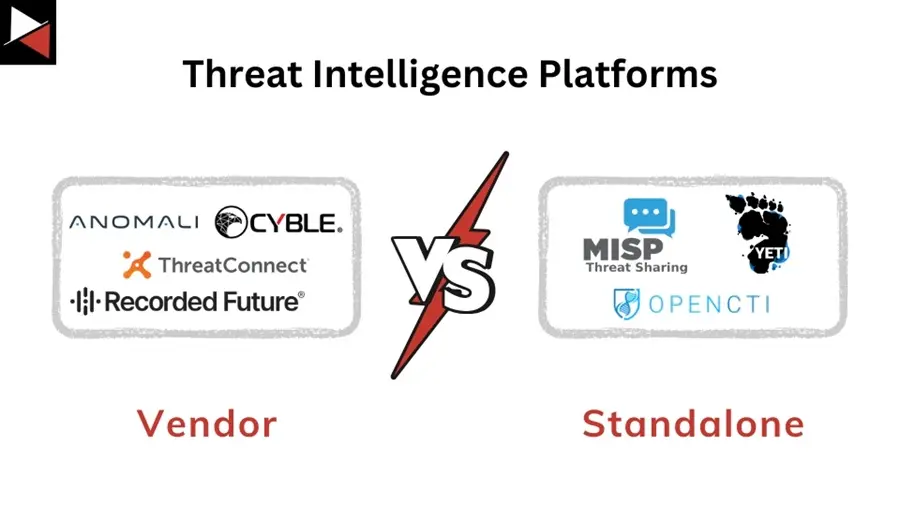
These are proprietary, commercial solutions offered by cyber security vendors, often as part of a broader security suite. They provide a polished, “out-of-the-box” experience complete with their own expertly curated threat feeds, advanced analytics, and a unified support structure with dedicated account managers.
Examples include platforms from well-known companies such as Recorded Future, ThreatConnect, Anomali, and Cyble.
Their key advantage is a low-friction setup and seamless integration with the vendor’s other security products (like EDR or firewalls).
This model is attractive to organizations that want a single point of contact and prefer a more managed, less resource-intensive approach. However, this convenience can come at the cost of flexibility.
They can sometimes operate as a “walled garden,” making it challenging and costly to integrate data from competing vendors or niche open-source feeds. This can lead to vendor lock-in, where migrating your data and workflows to a different tool in the future becomes a major, expensive undertaking.
You are essentially buying into that vendor’s entire ecosystem and their specific view of the threat landscape. So what’s the alternative?
Standalone & Open-Source Platforms
In contrast, standalone and open-source platforms are built for maximum flexibility and integration, serving as a central, vendor-agnostic hub.
They operate on the principle of open connectivity, allowing you to subscribe to any data source or CTI vendor you choose—free feeds, multiple premium feeds, industry-specific ISAC data—and correlate them all in one place. This allows you to build a truly customized intelligence picture tailored to your specific risks.
Open-source options, such as MISP (Malware Information Sharing Platform), OpenCTI, and YETI, are ideal for organizations that require granular control and possess the necessary technical expertise to manage them.
They excel at fostering powerful community sharing, allowing organizations to collaboratively defend against common threats by sharing near-real-time indicators with trusted peers.
This collective defense model is incredibly powerful. However, freedom and control come with the responsibility of more in-house resourcing. Your team will be responsible for the initial deployment, ongoing maintenance, patching, and developing custom integrations, which often requires staff with strong scripting and system administration skills.
This model is ideal for mature CTI teams who want to build a best-of-breed intelligence engine and have the in-house talent to support it.
Which Threat Intelligence Platform is Right for You?
Choosing the right TIP is one of the most critical security investments you can make as a CTI team.
The “best” platform isn’t the one with the most features on paper; it’s the one that seamlessly aligns with your organization’s specific needs, budget constraints, and current security maturity. Making the wrong choice can lead to a costly, underutilized tool that creates more work than it saves.
Here’s a detailed breakdown of how to approach the decision-making process.
Key Features to Evaluate
When comparing platforms, look beyond the marketing materials and examine these core capabilities.

Data Aggregation and Normalization
A TIP’s foundation is its ability to ingest data. It must be able to pull data from a wide variety of sources, including OSINT feeds, premium commercial feeds, government alerts, ISAC/ISAO communities, and your own internal tools. To achieve this, it must be able to handle multiple data formats (e.g., STIX/TAXII, JSON, XML, and simple CSVs).
But ingestion is only half the battle.
The platform must also normalize this data, translating it into a common, structured format so that a “malicious IP” from one feed can be directly compared to a “C2 address” from another. Without strong normalization, your TIP becomes a messy data swamp instead of a clean data lake.
Contextualization and Enrichment
Raw indicators are of limited value. A great TIP doesn’t just show you an IP address; it wraps it in layers of context. It should automatically answer the critical “so what?” questions:
- Who owns this IP?
- Where is it located?
- What is its reputation?
- Has it been associated with malware families or threat actors in the past?
The most powerful platforms take this a step further by mapping indicators to adversary Tactics, Techniques, and Procedures (TTPs) within frameworks like MITRE ATT&CK®. This transforms a simple indicator into a piece of a larger puzzle, helping you understand the adversary’s playbook and anticipate their next moves.
Meaningful Integration
Integration is about more than just having a logo on a webpage. The platform must integrate seamlessly and bidirectionally with your existing security stack.
This means it should be able to push high-confidence indicators to your SIEM for alerting, to your firewall for blocking, and to your EDR for threat hunting. In return, it should be able to pull observations and events from those tools.
For example, if your SIEM detects a suspicious login, it can query the TIP to determine if the source IP address is associated with known malicious activity, thereby enriching the alert in real-time.
This bidirectional flow is what turns your security tools from isolated silos into a collaborative ecosystem.
Intelligent Automation
Automation is what separates a modern TIP from a simple threat database. Look for a platform that automates the repetitive, low-level tasks that consume analyst time and resources. This includes the automatic ingestion, normalization, and scoring of data as well as the distribution of intelligence products (e.g., threat reports).
By handling these tasks, the platform frees up your human analysts to focus on high-value work, such as in-depth investigations, proactive threat hunting, and strategic analysis, rather than manual copying and pasting of indicators.
This not only improves efficiency but also reduces the risk of human error.
Visualization and Dashboards
Humans are visual creatures. A wall of text and IP addresses is difficult to interpret. An effective TIP must provide an intuitive interface with clear data visualization tools.
This includes not just bar charts and geographic IP maps, but also powerful graph analysis capabilities. A threat graph can visually connect the dots between a malware sample, the domains it communicates with, the IP addresses hosting those domains, and the threat actor group known to use that infrastructure.

This makes it incredibly easy to understand complex relationships and communicate risk to leadership and other non-technical stakeholders.
Flexible Threat Scoring
Not all threats are created equal. The ability to automatically score and prioritize threats is crucial for helping your team focus on what matters most.
A sophisticated TIP will have a flexible scoring engine that you can customize to suit your specific needs. You should be able to weigh different factors, such as the reliability of the intelligence source, the severity of the threat (e.g., a commodity banking trojan vs. state-sponsored espionage malware), and its relevance to your specific industry and geography.
This ensures that a threat actor known to target financial institutions will be scored higher for a bank than for a healthcare provider, allowing for effective threat prioritization tailored to your organization.
We’ve these factors in mind, let’s explore a selection process you can follow to accurately assess if a TIP is right for you!
The Selection Process
Before you even look at a demo, your team needs to do some internal homework. Answering these questions will give you a clear scorecard to measure potential platforms against.
Step 1: Define Your Goals (Tactical, Operational, and Strategic)
What specific problems are you trying to solve? Be precise.
- Are your goals tactical (e.g., “We need to automatically block malicious IPs at the firewall to reduce noise for our SOC”)?
- Are they operational (e.g., “We need to understand the TTPs of threat actors targeting our industry to improve our detection rules”)?
- Or are they strategic (e.g., “We need to provide the CISO with quarterly reports on the evolving threat landscape to justify our security budget”)?
A platform that excels at tactical blocking may not be the best for strategic reporting. Knowing your primary use cases is the most important first step.
Step 2: Honestly Assess Your Maturity
Be realistic about your team’s current capabilities.
- Is your organization just starting its CTI journey, primarily consuming open-source feeds? If so, you might prioritize a platform with a simple user interface and strong out-of-the-box automation.
- Or are you a mature team with dedicated threat hunters and malware reverse engineers? In that case, you’ll likely need a platform with a robust API for custom integrations, support for building complex queries, and the ability to create your own intelligence and share it with partners.
Choosing a tool that’s too advanced for your team will lead to frustration and poor adoption.
Step 3: Consider the Total Cost of Ownership (TCO)
Your budget is more than just the annual license fee.
- For commercial platforms, inquire about the costs associated with implementation, training, and premium support.
- For open-source solutions, the software may be free, but you must calculate the “soft costs” associated with the personnel required to deploy, configure, maintain, and integrate the platform.
This often requires at least one dedicated engineer. The TCO of an open-source tool can sometimes exceed that of a commercial one when all factors are considered.
Step 4: Scrutinize the Integration Ecosystem
Don’t just accept a vendor’s claim of “integration.” Ask for details. Is it a deep, bidirectional integration or just a simple data push? Is the integration plug-and-play, or does it require extensive custom scripting?
A TIP that doesn’t communicate effectively with your existing tools is destined to become an “island of misfit data”—a standalone portal that analysts have to manually check. This creates another data silo, defeating the entire purpose of a centralized platform and ultimately adding to your team’s workload instead of reducing it.
Conclusion
In today’s complex and fast-moving threat landscape, being purely reactive is a losing game. Adversaries operate at machine speed, and security teams cannot keep up by manually chasing every IOC.
A threat intelligence platform acts as a crucial force multiplier, enabling your security team to cut through the deafening noise of low-level events, identify relevant threats with surgical precision, and take proactive steps to defend your organization.
By centralizing and integrating intelligence across your security stack, you transform raw data points into actionable information that can inform mission-critical decisions. This allows you to keep pace with new adversaries, evolving TTPs, and harness the power of automation to free up valuable resources.




Frequently Asked Questions
What Does a Threat Intelligence Platform Do?
A threat intelligence platform automates the collection, aggregation, and analysis of threat data from numerous sources, allowing you to complete the CTI lifecycle. It enriches this data with context, correlates it to identify patterns, and integrates with other security tools to provide actionable intelligence, enabling security teams to detect and respond to threats proactively.
Which Threat Intelligence Platform is the Best?
The “best” threat intelligence platform depends entirely on an organization’s specific needs, budget, and maturity. Top-rated commercial platforms, such as ThreatConnect and Recorded Future, offer extensive features and support, while open-source options like MISP provide flexibility and control for teams with the necessary technical expertise to manage them. The right choice requires a thorough evaluation of your own requirements.
What is the Difference Between a SIEM and a Threat Intelligence Platform?
A SIEM (Security Information and Event Management) primarily collects and analyzes log data from internal systems to detect security events and support incident response investigations. A Threat Intelligence Platform (TIP) focuses on collecting and analyzing data about external threats and threat actors. A TIP enriches and refines intelligence before sending it to a SIEM, acting as a filter to reduce noise and provide context that helps the SIEM identify truly malicious activity.