
On 10 December 2021, Log4Shell dropped, and within hours attackers were scanning the entire internet with a string shorter than a tweet.
Inside enterprise SOCs everywhere, analysts scrambled to write the same detection three, four, five times over: once in Splunk’s SPL, once in Sentinel’s KQL, once in Elastic’s DSL. None of their tools spoke the same language. That was the moment Sigma rules proved their worth.
This guide will teach you how the Sigma detection format actually works, from its three-layer architecture and modifiers through to pySigma, the tool chain that turns a single YAML file into a query for almost any Security Information and Event Management (SIEM) platform.
You will learn how Sigma powers both detection engineering and threat hunting, and where Sigma rules quietly fail once they hit production. Let’s get started!
History of Detection Engineering: Zeek, Snort, Suricata
Detection engineering has evolved over the past few decades. Every detection paradigm that has emerged came about because the one before it had a blind spot that attackers learned to exploit.
- 1995, Bro (now Zeek): Vern Paxson built the first serious attempt at network-level behavioral analysis at Lawrence Berkeley National Laboratory. It tracked protocol state and connection anomalies as packets crossed a network boundary.
- 1998, Snort: Martin Roesch’s tool democratized detection with open rule sets, port matching, and payload string signatures. For the first time, community-written rules could be shared and deployed, and its architecture shaped everything that came after it.
- 2010, Suricata: The Open Information Security Foundation fixed Snort’s scaling issues. It introduced multi-threaded deep packet inspection running at enterprise speed.
- 2013, YARA: Moves the detection surface off the network and onto the endpoint, pattern-matching against binaries on disk using hex bytes and string signatures inside file structures.
As great as these detection tools were, they all shared the blind spot: they watch the border.
The moment an attacker is already inside, moving laterally, escalating privileges, or pulling credentials out of memory, these tools see nothing. They were ineffective when attackers are using PowerShell, Windows Management Instrumentation (WMI), and PsExec – tools your organization already trusts (living off the land).
Some analysts assume this list is a strict replacement chain, where each tool retires the one before it. It is not. Most mature SOCs still run Zeek, Suricata, and YARA today. Sigma did not replace them; it filled the gap they left open.
That gap is exactly where Sigma steps in. In 2017, Florian Roth and Thomas Patzke released Sigma, a detection language that targets system and application log telemetry instead of files or packets. It does not care what sits on disk. It watches what the system does: parent-child process chains, command line flag combinations, network socket allocations, and administrative share connections.
However, it doesn’t stop there. Sigma does something no prior standard attempted: it is platform agnostic. One YAML file, one piece of detection logic, compiled into whatever query language your SIEM happens to speak. Roth built Sigma around that single idea, a universal language where the rule is the plug, your SIEM is the wall socket, and the pySigma tool chain is the adapter you slot between them.
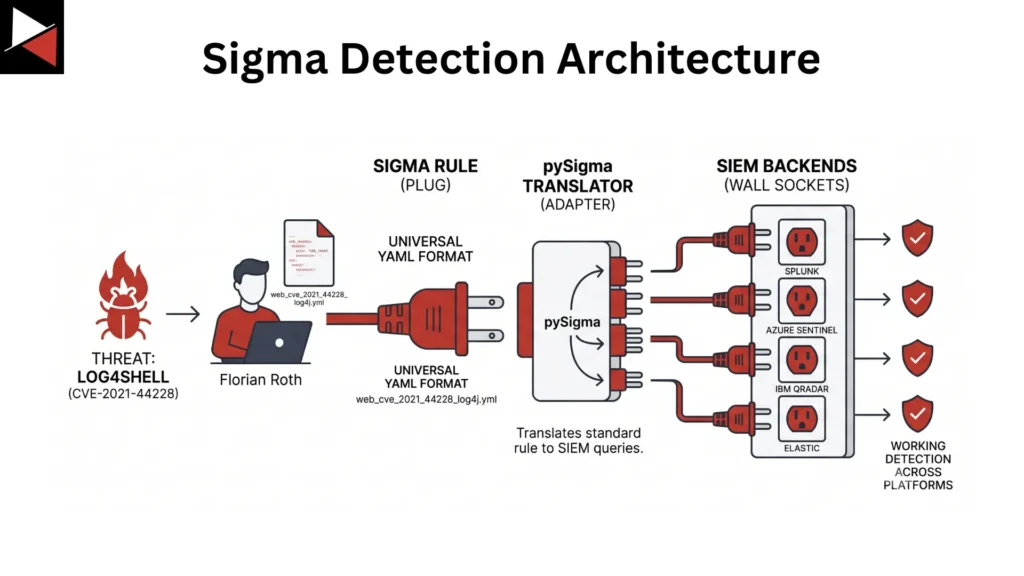
That Log4Shell case is the clearest proof of the concept. Roth published a rule to GitHub, and SOC analysts worldwide ran their converters and had working detections across completely different SIEM backends within minutes. But writing a Sigma rule and deploying one safely at scale are two very different engineering problems, which is exactly what the rest of this guide covers.
Sigma Rule Architecture
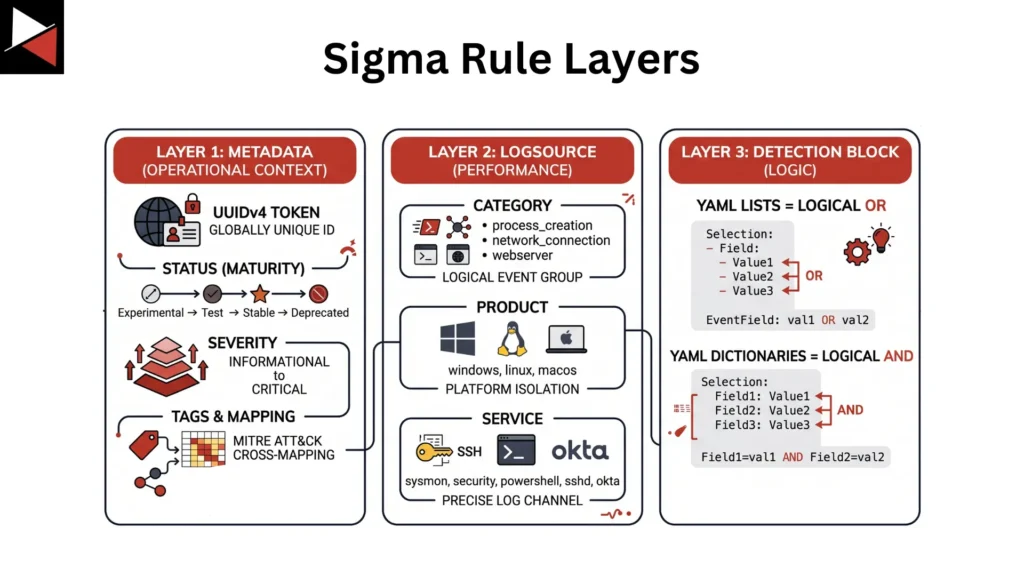
A valid Sigma rule organizes its top-level fields into three functional layers. Understanding each one is the difference between a rule that behaves predictably in production and one that quietly floods your SIEM with noise.
Layer 1: Metadata
Metadata is the operational context that surrounds a rule. Every rule carries a unique universally unique identifier (UUID), so it stays globally unique across a library of hundreds or thousands of rules. A status field tracks maturity, moving from experimental through test to stable and eventually deprecated. Severity runs from informational to critical, and the tags block cross-maps the rule into the MITRE ATT&CK framework or internal tags for tracking purposes.
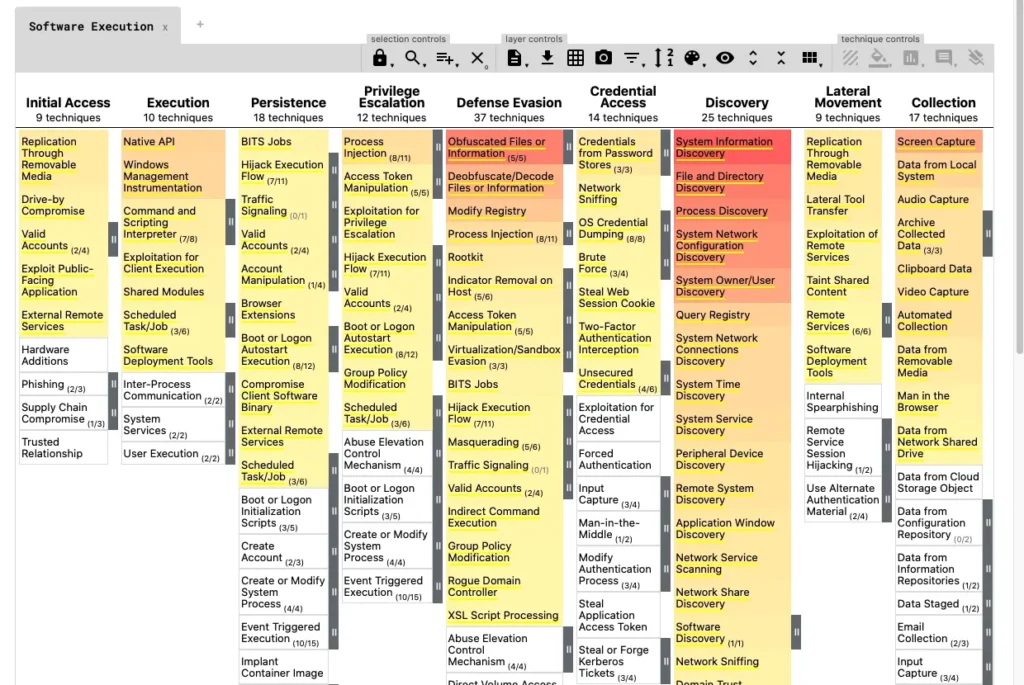
A rule written to catch an exploitation attempt, for example, ties straight into ATT&CK technique T1190 inside your SIEM’s taxonomy.
The ATT&CK mapping is not decoration. Automated pipelines read those tags to populate ATT&CK Navigator heatmaps, which is how teams measure their actual detection coverage against the framework instead of guessing.
Metadata also includes the rule’s title, description, author, dates, and any reference material the rule was built on. Include all of these so whoever is reading/implementing the rule has context on what it is trying to detect.
Layer 2: Log source
This is where performance lives, and it comes down to three attributes.
| Attribute | Purpose | Example |
|---|---|---|
| Category | Defines the logical event group | Process creation, network connection, web server |
| Product | Isolates the platform | Windows, Linux, macOS |
| Service | Selects the precise log channel | Sysmon, Security, PowerShell, SSHD |
Scope these tightly, and the backend touches only the data it needs. Leave it broad, and your rule sweeps the entire log store on every single evaluation.
There is also an optional definition attribute that carries deployment advice, telling you whether your endpoints are even configured to capture the telemetry a rule expects. A process creation rule is useless if your command line audit policy is not switched on, and that is a detection gap you will never spot on a SIEM dashboard.
Layer 3: Detection logic
This is where the actual logic lives, built with YAML lists and dictionaries.
YAML lists behave as logical ORs, and YAML dictionaries behave as logical ANDs. A dictionary needs every key-value pair to match at least once, while a list fires if any single value inside it appears. The condition statement at the bottom is the boolean glue, combining your selections with AND, OR, or NOT, along with shortcuts like “one of selection*” or “all of them.”
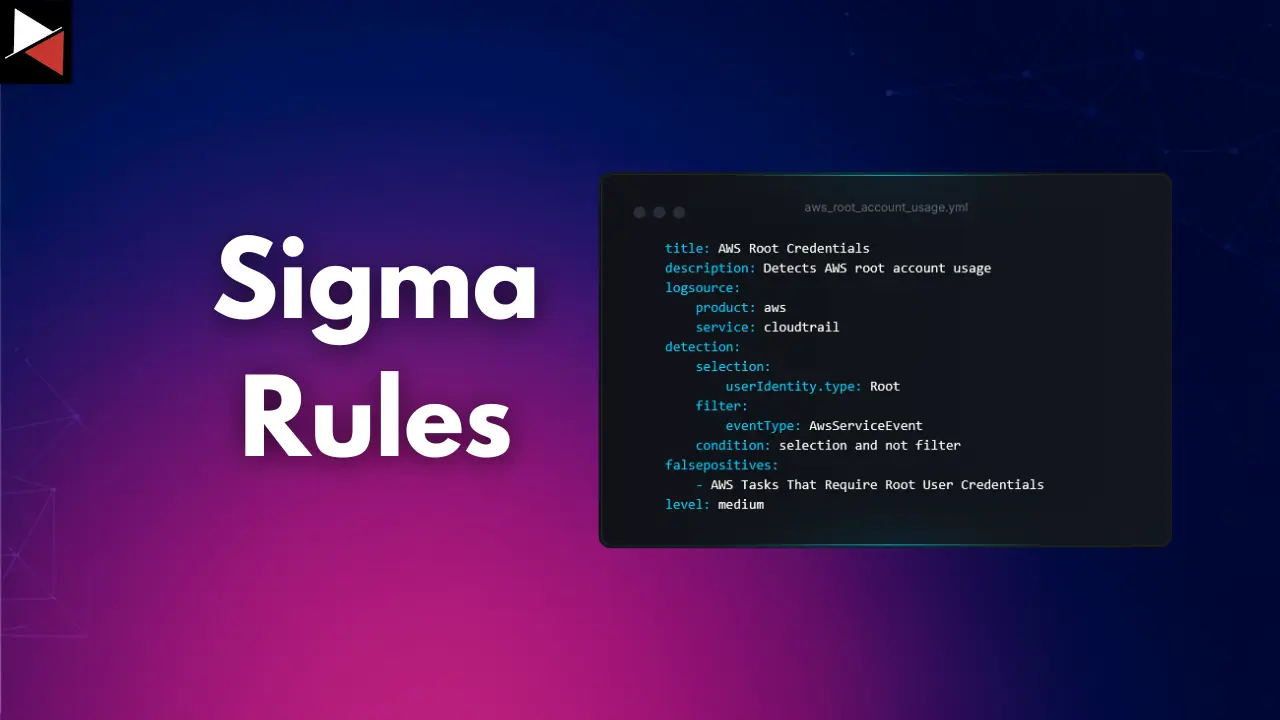
The production design pattern behind most real-world rules is simple: select the bad, then filter out the good. You isolate the malicious behavior with one selector, then subtract legitimate user/admin activity with a second selector joined by NOT.
This single pattern, “selection and not filter,” is responsible for keeping most Sigma rules usable instead of drowning analysts in false positives.
A minimal Sigma rule, layer by layer
# layer 1
title: Suspicious Rundll32 Execution via JavaScript
id: 3fa85f64-5717-4562-b3fc-2c963f66afa6
status: test
level: medium
tags:
    - attack.defense-evasion
    - attack.t1218.011
# layer 2
logsource:
    category: process_creation
    product: windows
# layer 3
detection:
    selection:
        Image|endswith: '\rundll32.exe'
        CommandLine|contains: 'javascript:'
    filter:
        ParentImage|endswith: '\explorer.exe'
condition: selection and not filterNotice the three layers at work: metadata (title, id, status, level, tags) sits on top, log source (category, product) scopes the rule to Windows process creation events, and the detection block applies the select-then-filter pattern covered above.
Now you know the components that make up a Sigma rule; let’s explore the features that turn these rules into actionable detections in production environments.
Modifiers
Modifiers are where Sigma earns its resilience. Append them to a field with a pipe delimiter to change how the value underneath gets evaluated.
- Contains: Wraps a string in wildcards so it matches anywhere in the field.
- Startswith / Endswith: Anchors the match to the front or back of a value. A rule looking for a value that ends with cmd.exe will not fire on a binary that just happens to contain that string mid-path.
- All: Flips a list from OR logic to a strict AND, requiring every item to appear. This makes it precise for order-agnostic flag checks.
- CIDR: Matches IP fields against subnet notation.
- Windash: Maps Windows flag prefix variants, so you get a match regardless of whether an attacker used a hyphen or a forward slash.
- RE: Hands the value to a regex engine for full pattern matching.
Keep the RE modifier in your back pocket. It is powerful, but it is also the most performance-draining modifier in the specification, since regex evaluation is far more expensive than a simple string comparison at scale.
These let you turn simple detections into production-ready rules with minimal overhead. The next piece is translating Sigma into your security tool’s detection language.
pySigma
So how does a YAML file actually become a query your SIEM understands? That is where pySigma comes in with its modular architecture.
The core library stays slim on purpose. It holds a YAML parser, the boolean logic handler, and the modifier evaluator. Everything platform-specific lives in separate, decoupled plugin packages, with one plugin per backend and one per pipeline. Each vendor maintains their own, so a Splunk backend update ships without anyone touching the Elastic plugin.
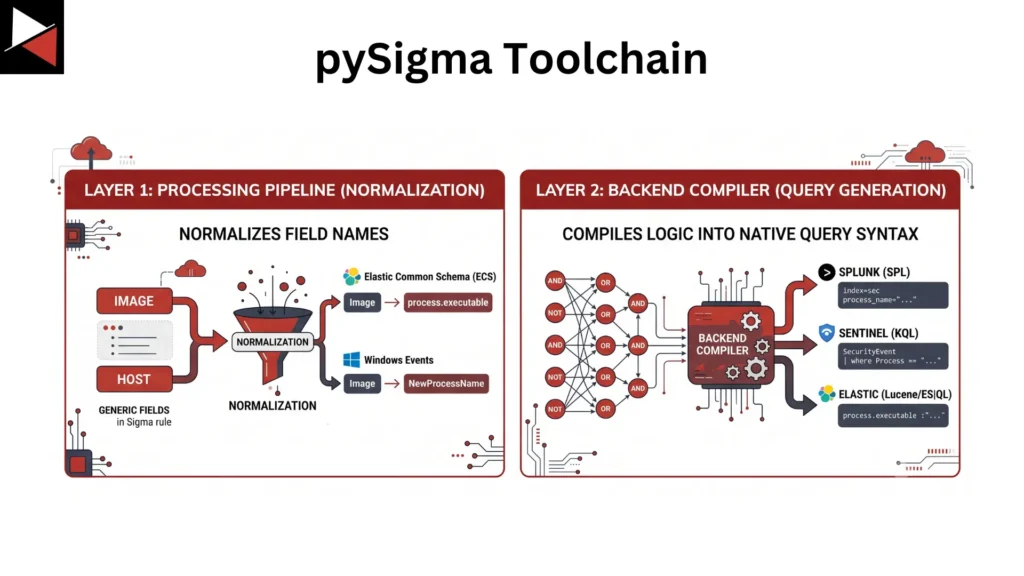
pySigma works in two layers:
- First, a processing pipeline normalizes field names. For instance, a generic Sigma field like “image” has to become “process.executable” in Elastic Common Schema (ECS) to work in your Elastic SIEM.
- Then a backend compiler turns the normalized boolean logic into native query syntax, whether that is SPL for Splunk, KQL for Sentinel, or ESQL and Lucene for Elastic.
pySigma is used through the sigma-cli command-line tool, which pySigma’s maintainers built specifically to replace the older, monolithic Sigmac converter. A typical conversion looks like this:
sigma convert -t splunk -p sysmon rules/windows/process_creation/
The -t flag picks the backend compiler, the -p flag applies a processing pipeline such as the Sysmon field mapping, and pointing the command at a folder converts an entire rule set in a single pass. That is the production workflow: pick your backend, pick your pipeline, point it at your rule set.
Remember that pySigma is a powerful abstraction, not a magic translator. The further your environment drifts from a standard ECS or Windows schema, the more custom pipeline engineering you have to do yourself.
Those are the basics of Sigma rules… but there’s more! In 2024, the team behind Sigma released version 2, which brought a range of improvements and enhancements. The biggest of these for most detection engineers were “correlation” rules.
Sigma v2 correlation rules
Everything covered so far describes single-event detection: one rule, one log entry, one match. But a huge slice of real attacker behavior cannot be modeled by a single-event rule.
Brute-force sequences, privilege escalation chains, and multi-stage exploits all unfold across more than one log entry. You would have to fire on each stage separately and correlate the results by hand, or lean entirely on your SIEM to stitch them together.
That was true until Sigma version 2 introduced correlation rules, and most analysts, whether they are doing detection engineering or active threat hunting, still are not using the full capability the specification now provides.
Correlation rules are separate meta-documents that reference your base rules by name and define conditions across multiple events. The specification includes four models.
- Event Count
Fires when a base rule triggers more than a defined number of times inside a time window. Ten failed logins in five minutes is a classic brute-force pattern. - Value Count
Watches the number of unique values in a field. A hundred failed logins across a hundred distinct usernames from one source is not brute force; it is password spraying, and that distinction is the entire signal. - Temporal
Fires when several different base rules trigger inside a timeframe, in any order. This is useful for a toolkit that drops multiple indicators at once. - Temporal Ordered
Fires only when base rules trigger in a strict, designated sequence, such as an inbound web exploit followed by a suspicious child process. This is your exploit chain detector.
Picture a credential-dumping scenario. A standard rule watching Local Security Authority Subsystem Service (LSASS) access fires on a single handle-access event, so an attacker renames the binary, runs it from a trusted process, and stages the operation across three machines over six hours. Every individual event looks like noise on its own.
Nothing trips… unless you have correlation rules set up.
A temporal ordered correlation rule chains suspicious LSASS access, followed by credentials appearing in the registry, followed by a lateral tool transfer, all inside a thirty-minute window. The sequence that looked like noise event by event becomes a confirmed tactics, techniques, and procedures (TTP) chain at the correlation layer, the same kind of multi-step attack path mapped out in a unified kill chain.
The version 2 specification deliberately limits itself to these four well-defined correlation types instead of open-ended aggregation, which is what keeps rules portable across SIEMs. Any backend that cannot support a given correlation type must throw a clear compilation error rather than deploy a broken query that never fires silently.
This all sounds great on paper. But what is the production reality of using Sigma rules in the real world?
Production Reality
Before you deploy Sigma rules into production wholesale, there is a reality most tutorials skip entirely.
Generic Sigma rules are broad by design, because they are built to survive in environments they have never seen. In yours specifically, that breadth will cost you.
Most false positives in a fresh deployment trace back to two undocumented things: missing exclusion filters and field mappings. A rule may expect telemetry your endpoints aren’t generating, field names that don’t match your schema, or a severity level that doesn’t line up with your escalation policy.
There is also a real gap in the pySigma plugin ecosystem itself.
The decoupled, vendor-maintained backend design is generally good engineering, but quality across those backends is uneven. Splunk and Elastic backends are mature, while others carry undocumented field gaps, missing modifier support, and no maintenance guarantees.
Before you build a pipeline that depends on a less mature backend, the answer to “does this handle my rules” is not the README. It is a continuous integration (CI) run against your own rule library, tested before anything reaches production.
In practice, that means replaying every new or modified rule against a small library of known-good and known-bad log samples, ideally generated with an adversary emulation tool, before the rule ever touches a live index.
The discipline that decides what to build in the first place, proves it works against emulated adversary behavior, and keeps it honest over time is detection engineering itself. It starts with requirements, moves through prioritization against the threats relevant to your environment, into building and validation, and finally into measuring your coverage against a framework like MITRE ATT&CK. Sigma is one tool inside that loop, not the loop itself.
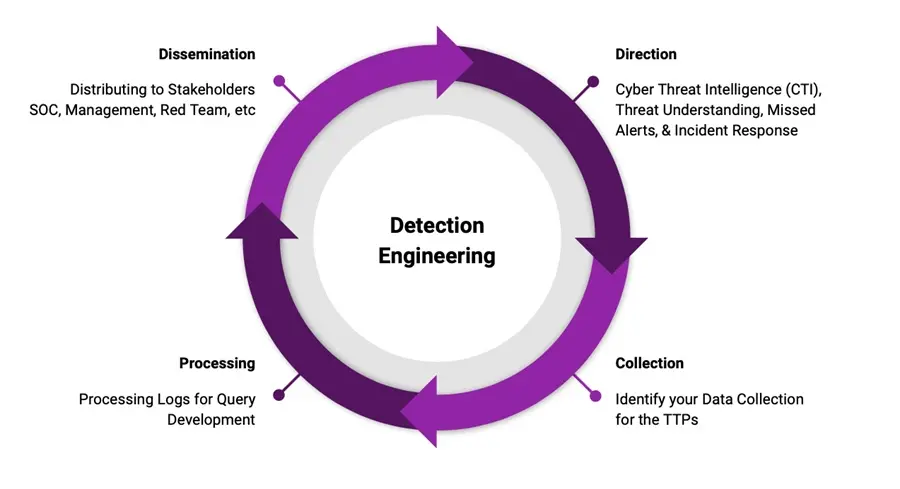
By the time you have worked through the full detection engineering lifecycle, your Sigma library stops being a folder of things you found on the internet and becomes the output of a repeatable process.
That is the real difference between writing rules and doing detection engineering.




Frequently Asked Questions
What is a Sigma Rule?
A Sigma rule is a platform-agnostic detection written in YAML that describes suspicious log activity, such as a process creation event or a network connection, in a generic format. A converter then compiles that rule into the native query language of whatever SIEM you use.
What is the Difference Between Sigma and YARA?
YARA scans files and memory for byte patterns and string signatures, answering the question “does this pattern exist in this file?” Sigma scans system and application log telemetry, answering “did this sequence of events happen inside a running system?” They solve different, complementary problems in a detection stack.
What is pySigma Used For?
pySigma is the Python library and toolchain that parses Sigma YAML and converts it into native SIEM query languages such as Splunk SPL, Microsoft Sentinel KQL, or Elastic Lucene. It replaced the older Sigmac converter and uses a modular plugin system of backends and pipelines.
Do Sigma Rules Support Correlation Across Multiple Events?
Yes. Sigma version 2 introduced correlation rules with four models: event count, value count, temporal, and temporal ordered. These let analysts detect multi-stage attacker behavior, like a credential-dumping chain, that a single-event rule cannot catch on its own.
Why do Sigma Rules Generate False Positives?
Most false positives in a fresh deployment come from missing exclusion filters and field mappings, not bad detection logic. Generic community rules are built broadly to survive across unknown environments, so they need to be tuned against your own telemetry, schema, and escalation policy before they are trustworthy.