
Cyber Threat Intelligence (CTI) analysts are drowning in an ocean of data, from the endless chatter on the dark web to a constant firehose of OSINT reports and premium threat feeds. The sheer volume is staggering!
How do you keep your head above water, let alone connect the dots? For many, the answer is a skill that’s often overlooked: effective CTI notetaking.
Failing to capture and organize information properly is a recipe for disaster. It leads to missed connections, duplicated effort, and critical details slipping through the cracks. This guide is here to change that.
We’ll dive into why CTI notetaking is an analyst’s superpower, explore the core principles of doing it right, and walk through the specific tools and techniques you can use to transform your messy notes into a structured, searchable, and actionable intelligence goldmine. Let’s jump in!
Want to listen on the go? Check out this article in podcast form!
Why CTI Notetaking is Critical
In CTI, you’re not just collecting data; you’re building a narrative about threat actors, their methods, and their motives. Effective CTI notetaking is the bedrock of this entire process.
It’s not just about jotting down IP addresses and malware hashes; it’s a strategic practice that helps you manage information overload and offload the intense cognitive burden of remembering every little technical detail.
This means actively connecting disparate facts—an adversary’s forum post, a specific CVE they exploited, and the domains they registered—into a coherent story of who they are and how they operate. These notes will empower you to deliver an actionable intelligence report that stakeholders will listen to.

Think of your notes as your personal “second brain,” an external and perfectly organized extension of your own memory.
A well-organized system enhances your analysis by allowing you to spot patterns that would otherwise be invisible, such as noticing a threat actor consistently uses a specific phishing lure, particular malware packer, or set of tactics, techniques, and procedures (TTPs).
This repository of information becomes invaluable during high-pressure incident response and investigation scenarios, saving you precious time when you need to recall information instantly. Instead of starting from zero, you can immediately provide context on an alert, enriching it with data on the adversary’s known infrastructure and typical behaviors.
Ultimately, great notes improve communication, streamline reporting, and are the foundation for the continuous learning required to stay ahead of adversaries.
So what makes a good set of notes?
Core Principles of Effective CTI Notetaking
To elevate your CTI notetaking from a simple habit to a strategic advantage, you need to follow a few core principles.

These guidelines ensure that your notes are not just a repository of facts, but a dynamic tool for analysis that fuels informed defensive actions.
Be Strategic
Every note should have a purpose directly tied to defending the organization. Do this by aligning your notetaking with your intelligence requirements and organizational priorities.
Focus on what’s actionable—intelligence that can be used to create a new firewall rule, hunt for a specific behavior, or brief a decision-maker, rather than what’s merely interesting.
Be Comprehensive
Capture the details that matter, but don’t stop there. Go beyond just the Indicators of Compromise (IOC)s and document the crucial context that gives them meaning: timestamps, sources, your own analytical thoughts, and most importantly, the “so what?” behind the data.
For example, don’t just note a malicious IP address; document that it’s a C2 server for FIN7, that it was first seen two days ago, and that it communicates over port 443 using a self-signed certificate. This context is what transforms a simple data point into information that can be used to generate valuable intelligence.
Be Accurate
Garbage in, garbage out is the immutable law of intelligence analysis. Acting on flawed notes can lead to a SOC team blocking a legitimate business partner’s domain or misattributing an attack, eroding trust in the CTI function.
A common mistake is treating all data as equal. Use tools and sound judgment to check the reputation of indicators, and be transparent about your confidence levels in both the source and the information itself.
Be Structured
Chaos is the enemy of analysis, especially under pressure. A structured approach makes your notes searchable, scalable, and easy for colleagues to navigate. This goes beyond just using templates and tags; it means creating a consistent format within your notes.
For instance, a note on a malware sample might have dedicated sections for static properties, dynamic analysis results, network indicators, and associated threat actors. This consistency ensures that anyone on your team can quickly find the exact piece of information they need without having to decipher your thought process.
Be Actionable
Your notes should directly facilitate defensive action. They are the raw material for your reports, briefings, and, most critically, your detections. A well-written note should be so clear that a detection engineer can use it to write a new Sigma rule, or an incident responder can immediately understand the threat actor’s likely next moves.
This means writing with clarity, avoiding unnecessary jargon, and summarizing key takeaways so they can be quickly understood and acted upon by others in the security organization.
Not all your notes will always follow these core principles. You might just quickly jot down a thought or anatomic indicator. When it’s time to share or organize your notes, aim to ensure that each of these principles is met.
With these principles in mind, let’s explore the main categories of CTI notetaking you will encounter.
Where CTI Notetaking Happens
CTI notetaking isn’t a one-size-fits-all activity; a master analyst adapts their approach to the task at hand. This means cultivating a mental toolkit of methods and knowing which one to deploy for a given situation.
The frantic, evidence-gathering phase of a live investigation calls for a different style of notetaking than the slow, reflective synthesis of a quarterly threat report.
The tools and techniques you use will vary depending on the context. Understanding these different scenarios is key to building a flexible and effective notetaking workflow that serves you at every stage of the intelligence lifecycle.
Here’s a look at the different contexts where your notetaking skills will be put to the test.

OSINT Investigation Notetaking
During an Open Source Intelligence (OSINT) investigation, you are dealing with the most volatile data imaginable. You need to capture web pages, user profiles, deleted tweets, temporary Pastebin posts, and forum chatter with forensic precision because they can vanish in an instant.
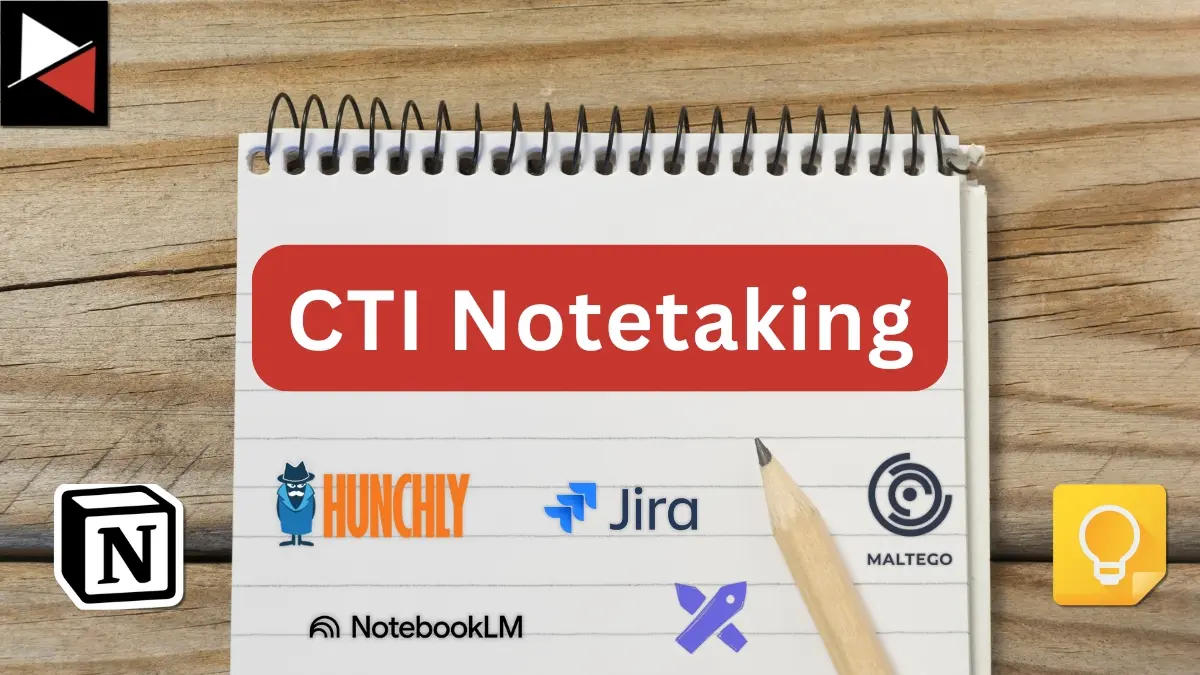
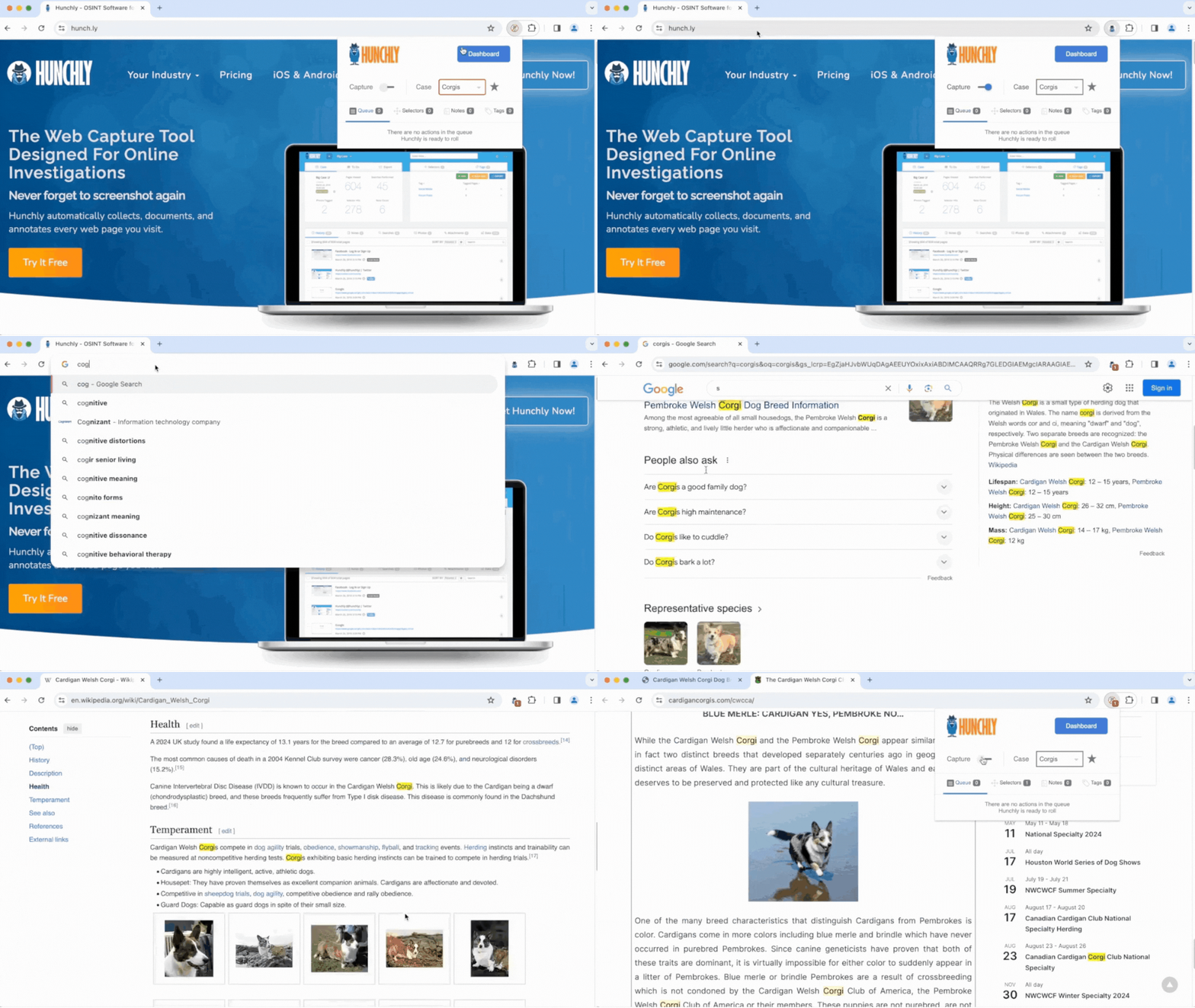
This is where tools like Hunchly become indispensable. This investigation tool creates a forensically sound local cache of every page you visit, complete with timestamps. It is designed for online investigations and automatically preserves and organizes the web pages you visit, allowing you to reference them easily.
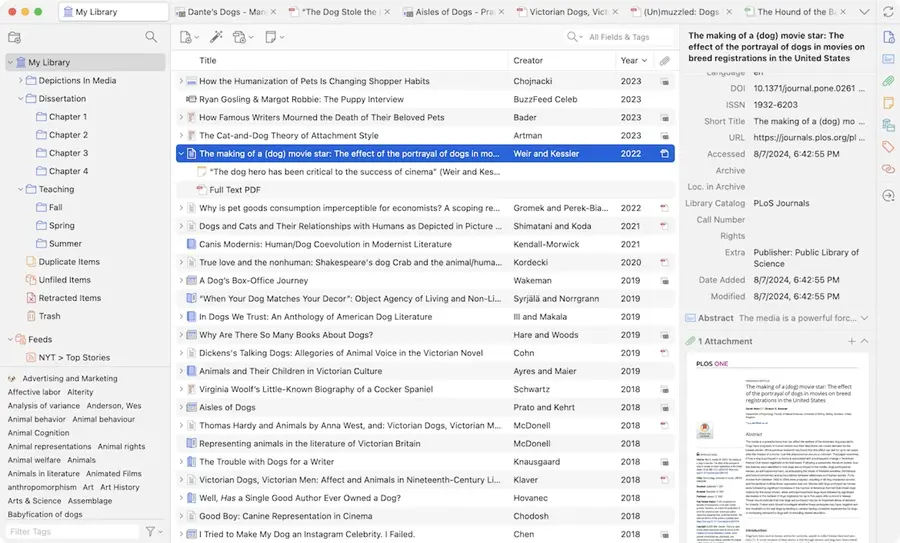
If you don’t want to go down the commercial route, you can use a free reference manager like Zotero or Mendeley to organize the mountain of reports and articles you uncover. They are invaluable for creating a structured archive that saves not just a link, but a snapshot of the content itself. Simply press the web browser extension to take a snapshot of any page you visit, and it will be populated in your reference library.
The key here is contemporaneous notetaking—documenting your steps, thoughts, and findings as they happen.
You want to preserve crucial context and the integrity of the data you find so that your findings can withstand scrutiny by providing a clear, defensible audit trail of what you saw and when you saw it. They may even need to withstand legal inquiry depending on where a case goes!
Link Analysis
When you’re trying to uncover hidden relationships between entities—like a threat actor, their malware, and their infrastructure—link analysis is your best friend. Your notes serve as the fuel for this entire process.
During an investigation, it’s often not enough to list indicators in a flat file; you must explicitly document the connections between them to build a graph of adversary activity.
- A weak note says, “Found IP 1.2.3.4 and domain evil.com.” This note is a dead end; it presents two facts but fails to establish a connection between them.
- A strong, actionable note says, “IP address 1.2.3.4 was used to register domain evil.com on 2023-10-26, which now hosts the C2 for malware sample XYZ.exe.” This note tells a story and provides multiple pivot points for further investigation.
This documentation of relationships is made easier using visualization tools like Maltego and IBM i2 Analyst’s Notebook to generate powerful, explorable graphs.
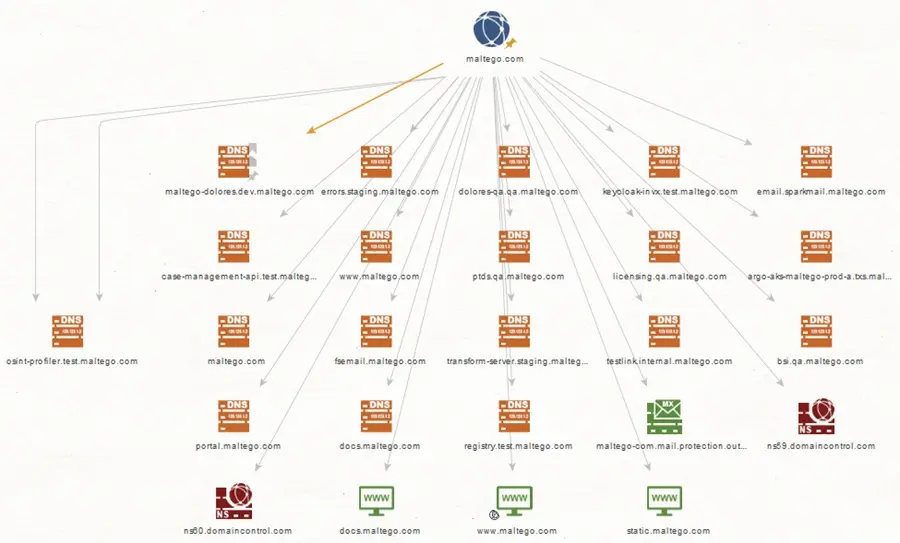
These tools ingest your structured notes and translate them into visual nodes and edges, highlighting the relationships between them. These relationships provide a clear map that can reveal the central “choke points” of an adversary’s infrastructure or a previously unknown link between two seemingly separate campaigns.
Link analysis, based on graph theory, can be helpful in various CTI investigations. It can be used to map out an adversary’s infrastructure, document the social structure of a ransomware gang, or link separate campaigns to one threat actor.
Knowledge Management
Once you have a set of notes from an OSINT investigation or have captured them on the fly, you need a way to manage them. This is where knowledge management and your “second brain” come in. An effective knowledge management system can take your scattered findings and synthesize them into durable, reusable intelligence.
For long-term storage and in-depth analysis, you need a robust knowledge management system that allows information to be interconnected and evolve over time. Tools like Obsidian and Notion are ideal for this, enabling you to create your own personal wiki of threat intelligence.
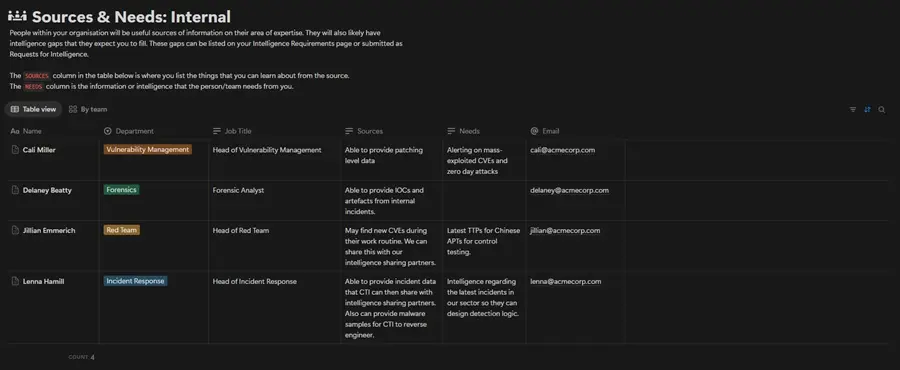
This is more than just a folder full of documents; it’s a living knowledge base. While a traditional folder structure is hierarchical and rigid, a modern knowledge base is a fluid network of ideas. Using features like bidirectional linking and tags, you can connect threat actors, campaigns, malware families, and TTPs.
Creating a note for “APT41” isn’t just making a standalone document. Linking keywords connects it to your knowledge base. Mentioning “Cobalt Strike” links to your master note, and tagging with #espionage ties it to other state-sponsored activity. When opening the “APT41” note, you can see all related notes, malware, campaigns, and exploited vulnerabilities.
This transforms a static archive into a dynamic, interconnected web of knowledge, allowing you to ask complex questions and see relationships across your entire body of work. Asking these questions reveals patterns that would be impossible to spot in a linear folder structure.
For advanced use cases, Notion offers extensive automation and database functionality, enabling you to create a bespoke knowledge base that can interact with various security tools and communication platforms. Meanwhile, Obsidian comes with a graph feature that you can use for link analysis within the tool itself!
On-the-Fly Notes
Not every thought needs a full-blown database entry. Forcing every fleeting idea into a rigid, pre-defined structure is a surefire way to stifle creativity and slow you down.
The most valuable insights often begin as messy, half-formed thoughts, and you need a place to capture them without friction.
For these quick ideas, unconfirmed hypotheses, or random tidbits of information you hear in a meeting—like a colleague mentioning a new tool or a file hash seen in a tweet—simple is often better. Tools like Apple Notes, Google Keep, or even a physical notebook are ideal for jotting down these thoughts instantly.

The goal is to lower the barrier to entry so much that you capture everything, no matter how small. The real trick, however, is establishing a disciplined process for regularly reviewing these fleeting notes and applying the five core principles of effective CTI notetaking.
A weekly triage habit—setting aside 30 minutes on a Friday afternoon to review the week’s jottings—is crucial.
During this review, you act as the curator of your own intelligence stream. You discard the irrelevant (“buy milk”), expand on the promising ideas (“that hash from the tweet is linked to a known C2, need to investigate further”), and formally integrate the valuable notes into your main knowledge base, complete with proper formatting and tags.
You go from capture to curate to store.
This simple habit prevents your quick-capture tool from becoming a digital junk drawer full of uncontextualized, useless information and ensures no good idea gets lost in the noise.
Project Management Integration
CTI operations are inherently project-based endeavors, characterized by defined tasks, specific stakeholders, and stringent deadlines.
Whether an analyst is addressing a formal Request for Information (RFI) or conducting a thorough investigation into an emerging threat group, their notetaking practices must align with established project tasks.
The integration of CTI notetaking methodologies with sophisticated project management platforms, such as Jira or ClickUp, is crucial to facilitate the transition from analytical insights to actionable steps.
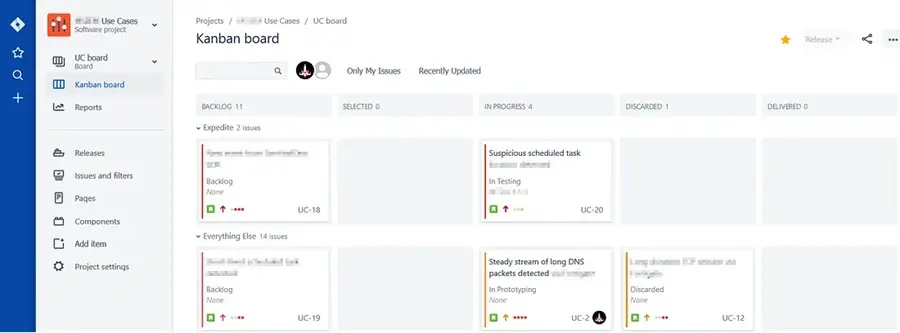
For instance, a critical finding documented in an analyst’s notes, such as a newly identified TTP, can be systematically converted into a trackable ticket within Jira and assigned to the appropriate detection engineering team to build a detection for. By linking the original, context-rich note directly to the ticket, a clear line of communication and information transfer is established.
Subsequently, as the engineer develops, tests, and deploys a new detection, the ticket is updated, and its resolution is recorded. This creates a seamless and fully auditable trail from the initial intelligence discovery to the implementation of a concrete defensive measure. Stakeholders are held accountable, and intelligence loops are closed.
If you’re jotting down notes during an investigation, ensure that you copy them into the associated report, ticket, or write-up and format them appropriately. You want these notes to tell a story that includes investigation statements and action statements:
- Investigation Statement = [Evidence you reviewed] + [Why you reviewed it] + [What you found]
- Action Statement = [What you did] + [Why you did it]
Visualization
It is often said that a picture is worth a thousand words, and in the context of CTI, a well-crafted diagram can be worth a thousand IOCs.
This is particularly true when communicating complex findings to less technical stakeholders, such as executives or board members, for whom a list of malicious domains is abstract and meaningless.
Visual notetaking transcends simple data presentation; it is a powerful analytical and communication tool.
- It can help an analyst brainstorm hypotheses by using a mind map to explore potential connections between a new malware sample and various known threat actors.
- It can help one map out intricate attack chains, using a flowchart to trace an intrusion from initial access to data exfiltration, making it far easier to identify where defensive controls failed or succeeded.
Tools like Lucidchart or Excalidraw are instrumental in this process, enabling the creation of professional-grade diagrams, intrusion flowcharts, campaign timelines, and analytical mind maps.

For example, an analyst could create a detailed timeline plotting key adversary actions—initial reconnaissance, domain registrations, malware compilation dates, and phishing waves—to reveal the attacker’s operational tempo.
Crucially, instead of having these valuable visuals scattered across Google Drive folders or SharePoint sites, they can be embedded directly into the primary notes within a knowledge base, such as Obsidian or Notion.
This practice of co-locating the visual with its corresponding textual analysis keeps all relevant context in one place, creating a richer, more comprehensive intelligence product that is significantly easier for everyone—from fellow analysts on the team to the CISO—to understand and act upon.
Visualizations are typically included in reports to help communicate a crucial finding or highlight a message. However, they can also be helpful to analysts during an investigation to answer investigative questions, create timelines, and spot anomalies. Explore the visualizations your security tools offer!
Bonus: AI Notetaking
The next frontier of CTI notetaking is here, and it is powered by artificial intelligence. This evolution represents a fundamental shift in the analyst’s role, moving from a manual summarizer and data correlator to a strategic analytical partner.
Modern AI tools are designed to augment, not replace, human intelligence. Tools like Google NotebookLM and Mem act as an “AI thought partner,” accelerating the synthesis phase of an analyst’s work.
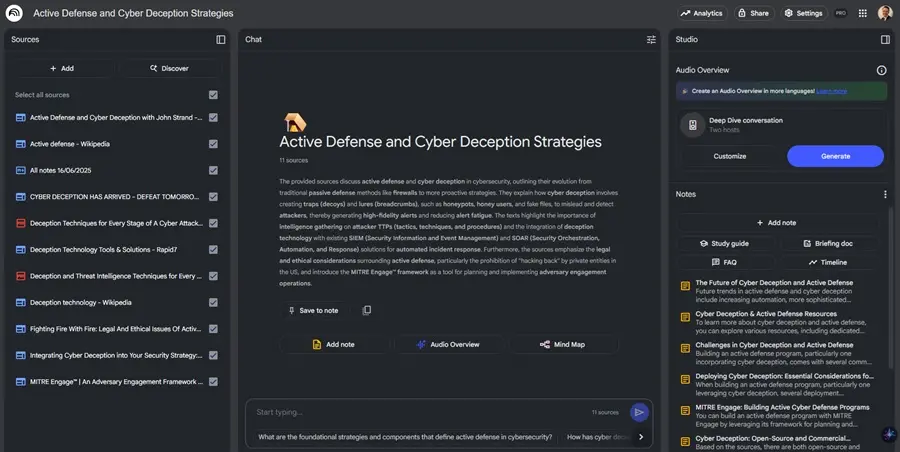
This goes far beyond simple keyword searching. For example, an analyst can provide these tools with a dozen different unstructured threat reports on a specific malware family and ask a high-level question like “Create a timeline of all observed TTPs, citing the source for each.”
The AI can then parse these documents and identify a critical pattern, such as the adversary consistently deploying reconnaissance tools three weeks before a major phishing campaign. This insight would have previously taken hours of meticulous manual correlation to uncover.
Furthermore, these tools can bridge the gap between raw intelligence and defensive action.
An analyst could ask, “Based on my existing notes about the FIN7 threat actor, what are the top three detection opportunities for our SOC?” The AI, having learned from the analyst’s entire knowledge base, might respond with precise and actionable advice, such as:
- Create a detection for the specific command-line argument FIN7 uses to launch Cobalt Strike.
- Hunt for this non-standard user-agent string that their C2 beacon uses.
- Monitor for the creation of scheduled tasks with the naming convention \Microsoft\Windows\Updater*.”
Additionally, AI-powered meeting assistants like Fireflies.ai or Otter can automatically transcribe and summarize technical discussions, extracting key action items and insights.

Ultimately, this allows analysts to offload the cognitive burden of manual data extraction and summarization. This frees up valuable time and mental energy for higher-level analysis, creative hypothesis testing, and strategic forecasting.
Fireflies and Otter are not the only AI-powered meeting assistants on the market. Many video conferencing platforms (e.g., Zoom, Microsoft Teams, and Google Meet) allow you to transcribe and summarize meeting notes through the power of their integrated AI solutions.
Best Practices for CTI Notetaking
Now you know where you will be performing CTI notetaking, let’s explore some best practices so you can create great notes starting today.
Create Templates
Don’t start from scratch every time. Develop templates for different types of analysis, such as threat intelligence reports, malware analysis, or incident response tickets. A good template enforces consistency and ensures that no critical piece of information is forgotten during a high-pressure investigation.
Tag Everything
A consistent tagging system is your best friend. Develop a clear and documented taxonomy for tags that covers threat actors (#actor-fin7), malware families (#malware-ursnif), TTPs (e.g., #ttp-t1059.001), victim industries (#victim-financial), and internal campaign names (#campaign-cosmic-badger).
This structured approach transforms your notes from a simple collection of documents into a queryable database, allowing you to instantly pull all information related to a specific malware or actor with a single click.
Prioritize TTPs
While it’s tempting to collect every IOC, focus your energy on documenting TTPs. As detailed in the Pyramid of Pain, domain names and IP addresses are easy for adversaries to change, making them fleeting intelligence. TTPs—the “how” of an attack—are far more durable and provide deeper insight into adversary behavior.
Documenting that an actor uses PowerShell for lateral movement is infinitely more valuable for long-term defense than documenting the specific IP they used yesterday. Use the MITRE ATT&CK Framework as your guide for classifying and documenting these behaviors.
Review and Refine
Your knowledge base is a garden, not a warehouse. It requires regular tending to remain useful.
Schedule time—perhaps weekly or bi-weekly—to review your recent notes. Prune what’s no longer relevant, merge duplicate entries to create a single source of truth, and refine your analysis as new information comes to light.
This process of active curation prevents your knowledge base from becoming stale and ensures it accurately reflects the current threat landscape and your team’s understanding of it.
Link, Don’t Just Copy
Avoid the trap of copying and pasting the same information into multiple notes. This creates data silos and a nightmare scenario when you need to update a fact.
Instead, link your notes. When you analyze a new malware sample used by APT29, create a note for that sample and simply link to your existing, comprehensive profile of APT29.
This creates a rich, interconnected web of knowledge, ensuring that when you update a source note (e.g., your APT29 profile), the updated context is automatically available everywhere it’s referenced.
Automate Your Inputs
An analyst’s time is best spent on analysis, not manual data entry. Use tools to automate the flow of information into your notetaking system wherever possible.
- Set up RSS feeds using a free CTI aggregator to pull in blog posts from security vendors.
- Use automation platforms like Zapier, Make, or N8N to create new notes from Slack alerts, emails, or other security tools.
- Transcribe and summarize your meetings with AI assistants.
This reduces manual effort, prevents burnout, and ensures you don’t miss a critical piece of intelligence because you were too busy with copy-paste tasks.
Conclusion
Mastering CTI notetaking is not just about being organized—it’s a fundamental shift in how you approach analysis, moving from a reactive collector of facts to a proactive builder of knowledge.
Good notetaking is about creating a disciplined system that acts as an extension of your memory and a force multiplier for your intellect. This system scales your analytical capabilities, allowing you to instantly recall a subtle detail from a year-old report during a live incident.
It transforms the daily flood of raw data—an uncontextualized IP address or a random hash—into the high-confidence, actionable intelligence your organization needs to stay secure. This is intelligence that tells a story, connecting that IP address to a specific threat actor’s C2 infrastructure used in a campaign targeting your industry.
By adopting these principles, tools, and best practices, you can move beyond simply taking notes and start building a true intelligence advantage that allows you to anticipate threats, not just react to them.




Frequently Asked Questions
What is the Purpose of CTI Notetaking?
In cyber threat intelligence (CTI), the purpose of CTI notetaking is to systematically capture, organize, and synthesize information to support analysis and decision-making. It serves as a personal knowledge base or “second brain,” reducing cognitive load and allowing analysts to track complex threats over time. Ultimately, it helps turn raw data into actionable intelligence for defending networks.
How to Take Effective CTI Notes?
To take effective cyber threat intelligence (CTI) notes, you must be strategic and structured. Use templates for consistency, tag your notes with a clear taxonomy (e.g., threat actors, TTPs), and focus on capturing context, not just data points. Regularly review and refine your notes to keep them relevant and link between related entries to build a web of interconnected knowledge.
What are some good tools for CTI Notetaking?
The best tools depend on the task. For long-term knowledge management, apps like Obsidian and Notion are excellent. For capturing evidence during OSINT investigations, Hunchly is a standard. For on-the-fly notes, simple tools like Google Keep or Apple Notes work well, while AI-powered tools like Google NotebookLM are emerging to help automate summarization and analysis.