
60% of small businesses that suffer a cyber attack close permanently within six months.
That number is brutal. The reason usually isn’t a missing firewall or a forgotten software patch. It’s a missing discipline: cyber threat intelligence (CTI).
The gap between the SMBs that survive and the ones that don’t usually comes down to one thing: whether they knew who was hunting them before the breach started. If you run a small or medium-sized business and think CTI is only for enterprises, this guide is for you. CTI for SMB is real, it’s achievable, and you can start this afternoon. Let’s get into it.
Why Small Businesses Are the Target, Not the Afterthought
Let’s start with the uncomfortable math, because it reframes everything.
Small businesses aren’t breached because they’re insignificant. They’re breached because they’re accessible. Verizon’s 2025 Data Breach Investigations Report found that 88% of breaches at SMBs involved ransomware, against 39% at large enterprises. Attackers go after organizations with limited security resources, then use them as a soft entry point into larger supply chains.
The financial stakes are existential. IBM’s 2025 Cost of a Data Breach Report put the global average breach cost at $4.44 million, and even a far smaller, six-figure incident can be terminal for a business on thin margins. That is the context for the often-cited National Cyber Security Alliance figure that 60% of small businesses close within six months of a serious breach. This isn’t an IT problem, it’s a survival problem.
You are not too small to be a target. You are the target because you are small. Accessibility, not value, is what puts an SMB in the crosshairs.
So how can CTI help?
What CTI Actually Is (And What It Isn’t)
Let’s clear something up first, because this confusion costs businesses real money.
CTI is not a feed.
A feed is raw data. IP addresses, file hashes, and malicious domains. Intelligence is the decision you make because of that data.
That distinction matters because roughly 47% of the smallest businesses (those with fewer than 50 employees) have no dedicated cyber security budget at all, a figure that recurs in industry surveys year after year. The ones who do spend it usually drop it on a threat feed, plug it in, and call it a program.
That’s a subscription. Not a capability.
To understand why, here are the three tiers of cyber threat intelligence you need to know:
| Tier | Focus | Key Indicators | Who Acts On It | Shelf Life |
|---|---|---|---|---|
| Tactical | Immediate technical threats | IPs, file hashes, URLs, domains | IT / SOC | Short (hours to days) |
| Operational | Attacker behavior and campaigns | TTPs, malware behavior, actor profiles | Incident response | Medium (weeks to months) |
| Strategic | Long-term risk and trends | Sector targeting, ransomware economics, geopolitics | Owners / leadership | Long (months to years) |
Tactical intelligence is easy to automate and obtain, but it has a short shelf life because attackers constantly rotate their infrastructure. Operational intelligence is far more durable because it describes behavior. An attacker can change an IP address in seconds. Changing their tradecraft takes months.
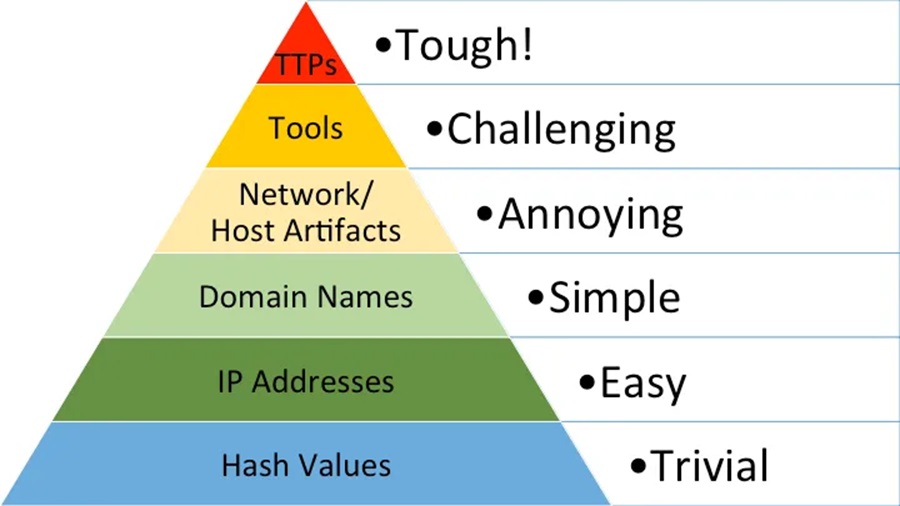
Here’s the mistake most SMBs make: they buy tactical feeds, hand them to nobody, and never produce operational or strategic intelligence. Those last two tiers are the only ones a business owner can actually act upon.
So how can you move from tactical intelligence to operational intelligence?
If you want to go deeper on the difference between raw data and finished intelligence, the guide on data, information, and intelligence is a good place to start. For more on how the tactical and operational layers connect to real decisions, see tactical CTI and operational CTI.
Why PIRs Are the Foundation of Any CTI Program
Most SMBs don’t need a threat intelligence platform. They need a threat intelligence decision.
That decision starts with Priority Intelligence Requirements, or PIRs. These are the specific, answerable questions your entire program is built around. Not vague concerns. Actual questions tied to actual decisions you can make.
- For a dental group, a PIR might be: “Which ransomware crews are targeting healthcare MSPs and service providers this quarter?”
- For a law firm, it might be: “Which threat actors are running extortion campaigns against professional services in our region?”
These aren’t abstract. They’re focused. That focus is what separates intelligence from noise.
Without PIRs, even a tool as powerful as MISP becomes an expensive RSS feed. If you can’t name three assets whose loss would close your doors, no amount of tooling will save you.
PIRs don’t need to be written by a CTI analyst. Any business owner can draft them. Start by asking: “What would a breach of X cost us?” and “Who has done this to similar businesses?” Those questions are your PIRs in rough form. You can then use this free intelligence requirements template to formalize them.
So where do PIRs fit into CTI? Let me introduce you to the CTI lifecycle.
The CTI Lifecycle Stage That Kills SMB Programs
CTI runs on a six-stage lifecycle: Direction, Collection, Processing, Analysis, Dissemination, and Feedback. The stage that kills most SMB programs is the first one.
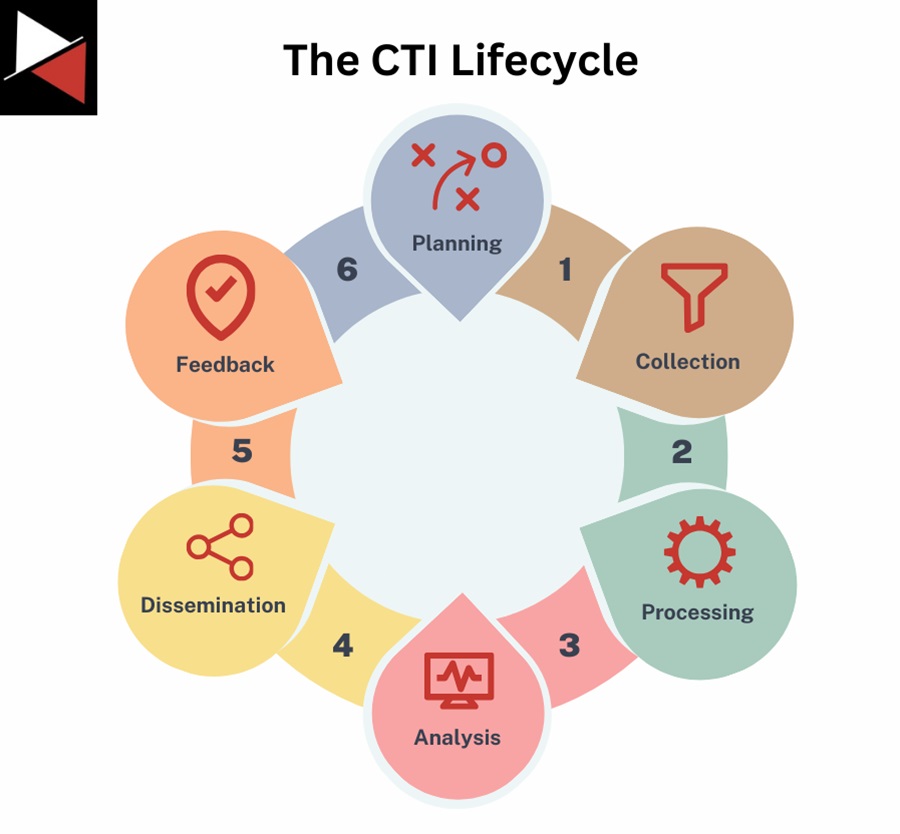
Planning / Direction is where you answer two questions before collecting a single indicator:
- What are you protecting?
- Who are you protecting it from?
Skip this, and you’ll collect everything, act on nothing.
Take the case of MBC Law, a Canadian litigation firm, which was breached in early 2024. A threat actor used brute force to gain access, exfiltrated sensitive data, and then emailed the firm’s clients and opposing counsel to escalate the extortion.
The firm went fully offline for two weeks and wasn’t operational again for a month. Rebuilding and forensics cost between $50,000 and $150,000. Worse, the firm had to forfeit a high-profile case it had worked on for a year, because it could no longer guarantee the confidentiality of the evidence.
Could CTI have stopped that brute force attack? Probably not.
But CTI would have flagged that the same tactics, techniques, and procedures (TTPs) were already being used against other firms in the same sector and region. The intelligence was out there. Nobody was looking for it. Nobody was prioritizing the right things.
That’s a direction problem, not a tools problem.
With your PIRs in hand, you can now align them with your business requirements (and its key assets) using threat modeling.
Your Lightweight Threat Model (Build It in 15 Minutes)
Before you touch a single tool, you need a threat model. I promise this one doesn’t require a consultant.
Take a piece of paper or open a spreadsheet. Three columns, 15 rows maximum.
- Column 1: Asset. What would kill the business if you lost it? Customer PII, case files, billing systems, production CAD drawings?
- Column 2: Adversary. Who realistically targets that asset in your sector? Ransomware affiliates? Initial access brokers? Insider threats?
- Column 3: Vector. How do they get in? Phishing, exposed RDP, a compromised managed service provider (MSP), supply chain attacks?
Here’s what a couple of rows look like filled in for various organizations:
| Asset | Adversary | Vector |
|---|---|---|
| Client case files (law firm) | Extortion-focused ransomware affiliates | Brute-forced RDP, phishing |
| Patient PII (dental practice) | Initial access brokers selling to ransomware crews | Compromised MSP, stolen credentials |
| Production CAD drawings (manufacturer) | Competitors, nation-state IP theft | Supply chain, phishing |
The table you create helps you align your Priority Intelligence Requirements with your business’s key assets, answering the question of what needs protecting and how it is commonly attacked.
Every piece of CTI you consume gets filtered through that list. Does it relate to anything on there? Act on it. If not, let it go. That filter is how you turn data into intelligence.
Why this model works for SMBs:
- No expertise required
Any business owner can build it in 15 minutes using industry breach reports and common sense. - Built-in relevance filter
You stop drowning in generic alerts and focus only on what threatens your specific assets. - Drives real decisions
When a relevant campaign surfaces, you already know which assets are at risk and how attackers typically get in. - Scales up naturally
As your CTI maturity grows, you can add rows, refine adversary profiles, and connect to more sophisticated tools.
Now you know what questions CTI should answer for your business. Let’s explore some free tools you can use to get started.
Free Tools to Operationalize Your CTI Today
Here’s where it gets practical. These tools cost nothing, and you can have them running before dinner.
AlienVault OTX
AlienVault OTX (Open Threat Exchange) is free and has more than 200,000 participants contributing around 20 million threat indicators. Search for your sector, find a “pulse” describing an active campaign, and look for targeting that matches your business profile. Pull those indicators and drop them into your firewall tonight. That’s operationalizing tactical CTI for SMBs in under 15 minutes.
A “pulse” in OTX is a collection of threat indicators grouped around a specific campaign or actor. Think of it as a pre-packaged intelligence report with IOCs attached. Find pulses tagged to your sector and subscribe to get updates automatically.
MISP
For the next level up, a MISP instance (free and open source) lets you correlate indicators and automatically ingest those OTX community pulses. More setup, but it turns a list of IOCs into a connected picture of who is doing what to whom. Import a single malicious IP, and MISP can show you every campaign and actor it’s been linked to by other members. This MISP getting-started guide is a good entry point if you want to go that route.
Shodan
Run Shodan against your own business to see what an attacker can see: forgotten servers, open RDP, default-password webcams. You might not love what you find, but you need to see it. Our walkthrough on C2 hunting with Shodan shows how far the tool can go.
Have I Been Pwned
Check whether your employees’ credentials are on a breach dump site at Have I Been Pwned. One compromised password is often all an attacker needs, and credential-based breaches take the longest to detect.
theHarvester
Use theHarvester to run reconnaissance on your own digital footprint for publicly leaked emails and subdomains. If an attacker can find it, so can you. Find it first.
For more starting points, see our roundup of threat intelligence sources and the intelligence collection plan guide.
Standing the tools up is the easy part. The mistake almost every SMB makes is collecting everything without a filter for relevance. 20 million indicators mean nothing if your business is a regional dental practice and 99% of those indicators target cloud workloads for financial firms.
Generic feeds produce generic alerts. Generic alerts produce alert fatigue. Alert fatigue produces breaches.
But monitoring your organization is no longer enough in 2026 (and beyond). There is a blind spot that most SMBs ignore!
The Third-Party Problem SMBs Almost Always Ignore
One more thing that doesn’t get nearly enough attention.
Third-party involvement in breaches doubled in a single year, from 15% to 30%, according to Verizon’s 2025 DBIR. Your managed service provider, your cloud vendor, your payroll software. If they get hit, you get hit.
Take the Absolute Dental incident from February 2025, where around 1.2 million patient records across 50 locations were exposed. That breach didn’t start at the dental group. It started at their managed service provider, where attackers used a malicious version of a legitimate software tool through the IT vendor’s account.
So your CTI program, and those PIRs you just wrote, must include your vendors.
Ask your IT provider in writing two questions:
- What threat intelligence sources do you consume to protect your clients?
- How would you notify me of a relevant campaign or a breach affecting my account?
Keep the reply. If they can’t answer those questions, start looking for another provider.
CC your cyber insurer on that email. It creates a paper trail that may matter in a claim and signals to your provider that you’re serious. Some insurers now require evidence of third-party intelligence sharing as a condition of coverage.
Let’s formalize all this into an action plan you can start today!
Your CTI Action Plan for This Afternoon
Here’s what I want you to do today. Not next quarter. This afternoon.
- Build your three-column threat model. Asset, adversary, vector. Maximum 15 rows. This is your PIR list.
- Create a free OTX account. Subscribe to two or three pulses that match your sector. Take the indicators and plug them into your firewall, or send them to your IT contact to implement.
- Email your MSP and CC your insurer. Ask what threat intelligence they use to protect your account and how they’d notify you of a relevant campaign. Keep the reply.
No enterprise budget. No dedicated analyst. Three actions. Done.
Don’t Stop There: Join an Intelligence Sharing Network
The SMBs that survive attacks don’t go it alone.
They share indicators with peers in their industry, join Information Sharing and Analysis Centers (ISACs), and tap into community intelligence that no single business could generate on its own.
- A dental practice can plug into the Health-ISAC.
- A local government office has the MS-ISAC.
- A manufacturer has the IT-ISAC and sector equivalents.
You can find the full list on the National Council of ISACs website.
Joining your sector’s ISAC turns a one-person program into a network, and that network effect is exactly what the CTI sharing communities guide covers in detail.
Conclusion
A small business CTI program doesn’t start with a budget line. It starts with a threat model and two honest questions:
- What are you protecting?
- Who is realistically coming for it?
The tools are free, the process is learnable, and the first meaningful result takes an afternoon. The 60% of breached SMBs that close within six months aren’t just unlucky. They’re unprepared. A lightweight threat model, a free OTX feed filtered through your PIRs, and a direct conversation with your MSP puts you ahead of most.
The barrier was never money. It was knowing where to start. Now you do. Good luck!




Frequently Asked Questions
How Do SMBs Use CTI?
SMBs can apply cyber threat intelligence concepts within their organizations by focusing on the basics and nailing their program’s direction. Rather than enterprise-grade platforms, SMBs use free tools, focused threat models, and priority intelligence requirements to understand who targets their sector and how to protect their most critical assets.
Do Small Businesses Really Need Threat Intelligence?
Yes. The widely cited National Cyber Security Alliance figure holds that roughly 60% of small businesses close within six months of a serious breach. Threat intelligence helps SMBs understand who is targeting businesses like theirs, what TTPs those attackers use, and how to prioritize defenses before an incident occurs.
What Are Priority Intelligence Requirements (PIRs) for SMBs?
PIRs are the specific, answerable questions your CTI program is built to address. For an SMB, a PIR might be: “Which ransomware groups are targeting healthcare MSPs in our region?” Every piece of threat intelligence you consume should be filtered against your PIRs to determine whether it’s relevant to your business.
What Free CTI Tools Can SMBs Use?
Several free tools are well-suited to SMBs: AlienVault OTX for sector-specific threat feeds, MISP for indicator correlation, Shodan for internet exposure analysis, Have I Been Pwned for credential breach checking, and theHarvester for digital footprint reconnaissance.
How Does Third-Party Risk Impact SMBs?
Third-party involvement in breaches doubled to 30% in a single year, according to Verizon’s 2025 Data Breach Investigations Report. SMBs should include vendor risk in their PIRs and ask their IT providers in writing what intelligence sources they use and how they would notify clients of a relevant threat or breach.