
In 2013, a $1.6 million security system flagged the Target breach as it happened. The alerts fired at top severity and still went unheeded, because the ticket said little more than malware.binary.
Forty-four years earlier, a NASA engineer got the same kind of call right during the Apollo 11 landing, thanks to one handwritten page.
The difference? Somebody bothered to write it down.
This guide explains why detection-rule documentation determines whether people act on your alerts. You will learn the 10 sections of Palantir’s Alerting and Detection Strategy (ADS) framework, copy a complete worked example, and build a detection-as-code pipeline that stops your documentation from rotting. Then we’ll watch it all play out during a live incident.
Let’s jump in!
Why Detection Rule Documentation Matters
Every detection rule you have ever deployed is a claim. It claims that a specific pattern of behavior means something bad is happening.
If nobody documents why you made that claim, what it assumes, and what breaks it, you haven’t built detection.
You’ve built a coin flip with a UI.
That is the heart of detection engineering. Writing the query is the easy part. Capturing the reasoning so the next person can act on it is where most teams fall down.
Target Breach vs Apollo 11 Landing
According to Bloomberg Businessweek’s investigation, Target began installing a $1.6 million FireEye malware detection tool six months before the breach. A team in Bangalore monitored it around the clock and reported anything suspicious to the security operations center in Minneapolis.
The tool worked. When the attackers deployed their malware on November 30, 2013, it raised an alert labeled malware.binary, followed by more alerts as new versions landed. Each one carried the most urgent rating on FireEye’s graded scale, and Bangalore passed them on.
Minneapolis reviewed the alerts and, according to Target’s statement to reporters, decided they did not warrant immediate follow-up. Roughly 40 million card numbers walked out the door.
The sensor didn’t fail. The alert did. A generic label gave the reviewing analyst no threat model, no asset criticality, and no response steps to weigh against a busy queue. Top severity didn’t save it either. Severity tells an analyst how loud an alert is. Documentation tells them what it means.
Now compare that to Jack Garman’s console during Apollo 11’s descent.
Before the mission, a training simulation ended with a wrongly called abort because of a computer alarm. Flight director Gene Kranz responded by ordering something wonderfully boring: study every possible computer alarm and write down what to do about it.
Garman, then 24, built a handwritten list of every alarm code and the correct reaction, and kept it under the glass on his console. In his account of the 1202 alarm, drawn from his 2001 NASA oral history, he recalls Kranz making the team study alarms that could never happen.
When the 1202 alarm lit up on the way down to the lunar surface, Garman didn’t have to reason from first principles under pressure. He checked his list and made the call: if it didn’t keep recurring, we’d be fine.
The Eagle landed.
A Rule Library Is Not a Detection Program
Most security teams don’t have a detection engineering program. They have a rule library with a subscription attached.
Here is a quick test. Pick any alert in your queue. Can an analyst tell you, from the alert alone, what behavior it models and what would make it wrong?
If not, you have an accumulation problem waiting to happen. Your analysts pay for it every shift, burning hours on alerts they can’t rule in or out quickly.
Undocumented alerts are a symptom, though… and the cause goes back much further.
How Detection Rule Documentation Broke
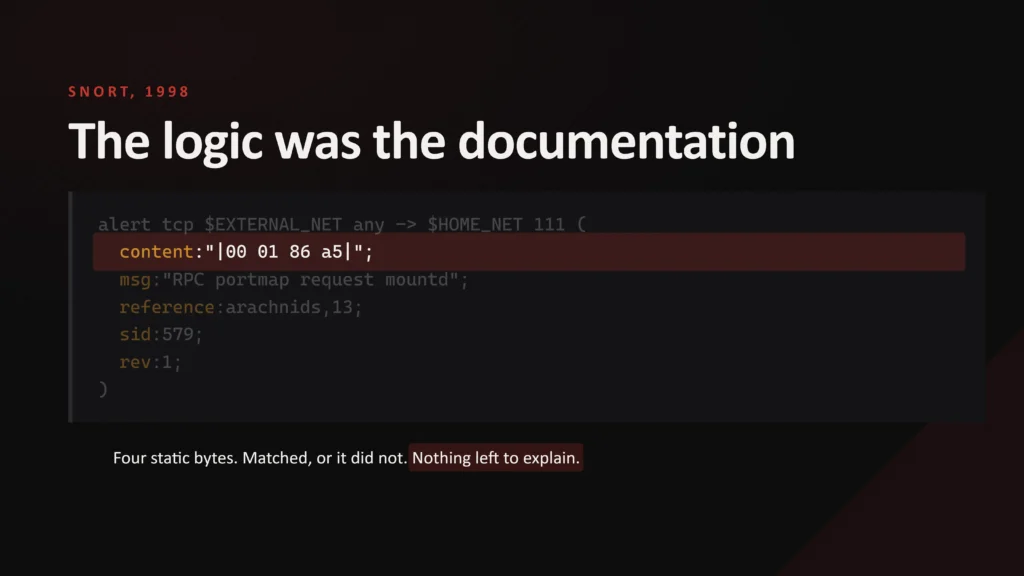
In the 1990s, Snort signatures matched static byte sequences. A one-line comment was enough because the logic explained itself.
Then Security Information and Event Management (SIEM) platforms centralized everything except the reasoning behind each rule. You’ve probably inherited a console full of queries nobody remembers writing, with no author and no hypothesis. Under pressure, analysts quietly disable the noisy ones or bolt on permissive exceptions, and each one opens a blind spot nobody chose.
MITRE began building ATT&CK in 2013 and released it publicly in 2015. The MITRE ATT&CK framework gave everyone a shared vocabulary, but labeling an alert LSASS Memory still says nothing about what a false positive looks like.
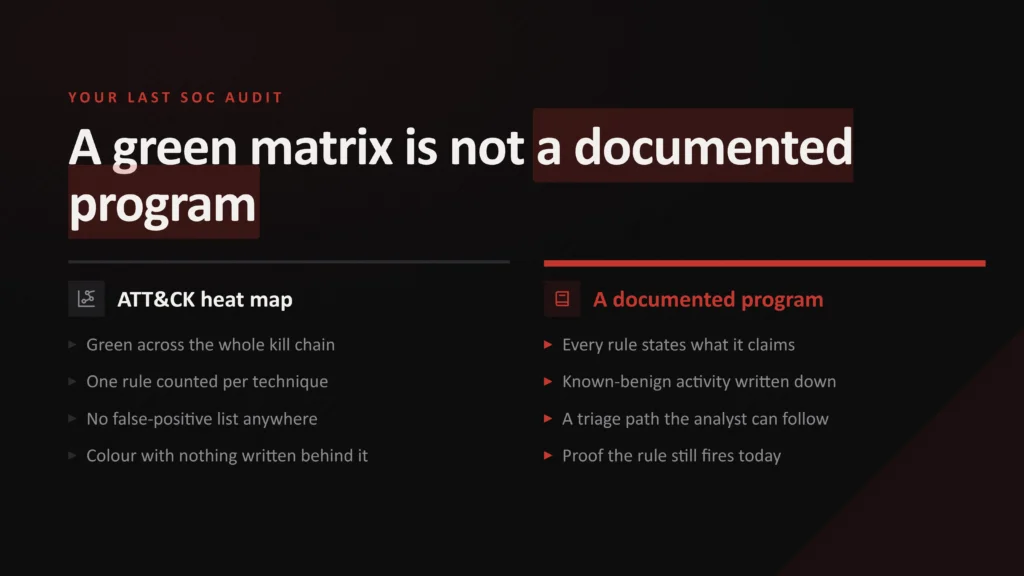
A pristine coverage map in ATT&CK Navigator and a documented detection program are different things. I’ve reviewed heat maps glowing green across the whole kill chain where not a single rule had a written false positive list. Coverage like that is a color-coded spreadsheet with nothing behind it.
So how do you fill the gap? Let me introduce you to the framework that does exactly that.
The ADS Framework: Alerting and Detection Strategy Explained
In 2017, Palantir’s incident response team published the Alerting and Detection Strategy (ADS) framework and released it on GitHub under an MIT license.
The rule is simple: complete and peer-review every section before an alert reaches production.
Think of it like a recipe card for every alert. Anyone in the kitchen can pick it up and cook the same dish, even if the chef who wrote it went home hours ago.
| Section | ADS Section | What It Captures |
|---|---|---|
| 1 | Goal | The specific adversary behavior, stated as a falsifiable claim (never “detect anomalies”) |
| 2 | Categorization | The ATT&CK tactic and technique, parent and child |
| 3 | Strategy Abstract | Data sources, enrichment, logic, and false positive filtering at a high level |
| 4 | Technical Context | How the underlying mechanism works, so a responder can judge the alert without being a subject matter expert |
| 5 | Blind Spots and Assumptions | What must be true for the rule to fire, and how an attacker defeats it |
| 6 | False Positives | The defining traits of legitimate activity that triggers it |
| 7 | Validation | Steps or a script that produce a true positive on demand |
| 8 | Priority | The criteria for each severity level |
| 9 | Response | The triage and investigation steps for the next responder |
| 10 | Additional Resources | Internal and external references behind the rule |
Palantir’s README lists nine sections, but the framework template itself includes Additional Resources as a 10th. Use all 10.
All 10 sections matter, but four of them carry most of the weight during triage:
- Blind Spots and Assumptions is the section teams skip most, and the one that matters most. It turns a guessing analyst into a checking analyst.
- False positives need precision. “Admin activity” isn’t a false-positive list. The legitimate job has the exact host, account, parent process, and file path.
- Validation proves the rule still works. Palantir’s own template suggests scripts like Atomic Red Team tests, which become your automated test once you move to detection as code.
- Response should be numbered steps an analyst can follow, not a shrug and some generic advice. My guide to building enterprise-ready incident response playbooks shows how to write steps that hold up under pressure.
Palantir also published worked examples, such as its Little Snitch Discovery ADS, which targets the Python Empyre framework on macOS. Reading one end to end is the fastest way to see the standard Palantir set.
But what does a complete ADS look like for a Windows threat your SOC faces today? Let’s build one.
A Complete ADS Example: Detecting ntdsutil IFM Snapshots
Here is a full ADS for a technique attackers love: creating an Install From Media (IFM) snapshot of the Active Directory database with ntdsutil.exe. It maps to OS Credential Dumping: NTDS (T1003.003), and we’ll use this exact rule later in the incident scenario.
The environment details (hosts, accounts, paths) are illustrative. Replace them with yours. Many organizations have no legitimate IFM activity. If that’s you, delete the False Positives entry and treat every hit as critical, which makes this one of the highest-fidelity rules you can deploy.
These two sections do most of the work during triage:
## False Positives
- Quarterly IFM staging job: scheduled task on DC01 runs StageIFM.ps1
  as svc_dcstage, writing to D:\IFMStaging. Logon type 4 (batch), with
  a parent chain through the Task Scheduler service. Never writes to
  C:\Windows\Temp.
- DC promotion using IFM: infrastructure team, always with a change ticket.

## Response
1. Check the command line for "ifm" and record the output path.
2. Check the user and how it logged on. Match the process LogonId to
  Security Event ID 4624. Anything other than svc_dcstage with logon
  type 4 (batch) fails. The parent chain should run through
  svchost.exe -k netsvcs -p -s Schedule.
3. Check the output path. Anything other than D:\IFMStaging fails.
4. If any check fails: disable the account, contain the host per the
  domain controller runbook, and escalate as suspected domain
compromise (plan a double krbtgt password reset).A quick quality test: if you could paste a section of your ADS into any other rule unchanged, it is too vague. Rewrite it until it only fits this one.
View the rest of the ADS (the other eight sections)
# ADS: NTDS.dit IFM Snapshot via Ntdsutil

## Goal
Detect an adversary creating an IFM snapshot of the Active Directory
database (NTDS.dit) with ntdsutil.exe to extract password hashes offline.

## Categorization
Credential Access / OS Credential Dumping: NTDS (T1003.003)

## Strategy Abstract
Process creation events from domain controllers (Sysmon Event ID 1, or
Security Event ID 4688 with command line logging). Matches ntdsutil.exe
by image or original file name where the command line contains "ifm".
Enriched with the parent process chain, the user, and the logon type
(joined from Security Event ID 4624 on LogonId).

## Technical Context
IFM exists to seed new domain controllers from media instead of network
replication. "create full <path>" writes NTDS.dit plus the SYSTEM and
SECURITY registry hives to <path>. With the SYSTEM hive, an attacker can
extract every stored hash offline, including krbtgt (used to forge
Kerberos tickets). The binary is native and Microsoft signed.

## Blind Spots and Assumptions
- Assumes command line logging is enabled on every domain controller.
- A renamed binary is caught by OriginalFileName only if telemetry
  records it.
- Misses NTDS.dit theft via Volume Shadow Copies (vssadmin, diskshadow),
  raw disk reads, and DCSync. Separate ADS cover those.

## False Positives
(Shown above.)

## Validation
In the lab domain, on a domain controller, run:
ntdsutil "ac i ntds" "ifm" "create full C:\Windows\Temp\ads-test" q q
Confirm the alert fires within five minutes. The output contains real
credential material from the lab domain, so securely delete it.

## Priority
High by default. Critical if the user is not svc_dcstage, the logon
type is not 4 (batch), or the output path is not D:\IFMStaging.

## Response
(Shown above.)

## Additional Resources
- https://attack.mitre.org/techniques/T1003/003/
- https://github.com/redcanaryco/atomic-red-team (T1003.003 tests)View the matching Sigma rule
title: NTDS.dit IFM Snapshot via Ntdsutil
id: d9ecb2dc-cb01-469e-887b-8ed54bb9dd71
status: experimental
description: Detects ntdsutil.exe creating an Install From Media (IFM) snapshot of the Active Directory database.
references:
    - https://attack.mitre.org/techniques/T1003/003/
author: Adam Goss
date: 2026-10-19
tags:
    - attack.credential-access
    - attack.t1003.003
logsource:
    category: process_creation
    product: windows
detection:
    selection_img:
        - Image|endswith: '\ntdsutil.exe'
        - OriginalFileName: 'ntdsutil.exe'
    selection_cli:
        CommandLine|contains: 'ifm'
    condition: all of selection_*
falsepositives:
    - Scheduled IFM staging jobs run by a dedicated service account
level: highDetection as Code: Stop Your Documentation From Rotting
You have a great ADS. Now, where does it live?
Palantir’s README lets you store it anywhere durable and version-controlled, including a wiki. In practice, a wiki that sits apart from the rule drifts. Someone changes a filter six months later and never touches the page.
That is documentation drift, and it’s the default state of any documentation system without tooling to enforce it. Detection as code exists to stop it.
This section assumes your rule logic is written in a format you can diff, review, and migrate. If it is still trapped in proprietary query syntax, fix that first with Sigma. My guide to writing custom Sigma rules will get you started.
How to Build the Pipeline
Follow this five-step process:
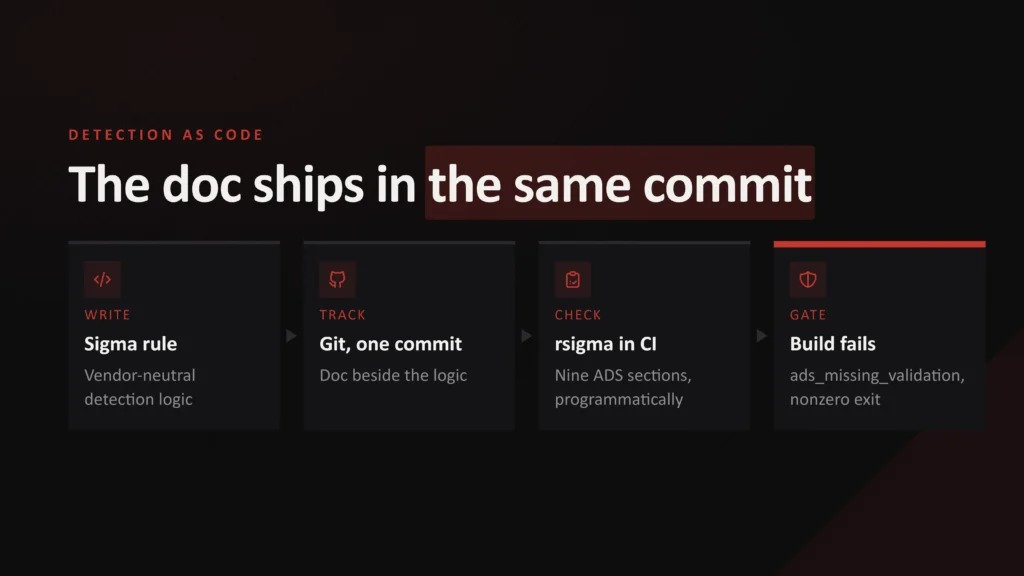
- Put the rule and its ADS in one folder. Use one folder per detection, containing rule.yml, ads.md, and a validation script.
- Track everything in Git. Every change gets an author, a timestamp, and a reason.
- Change logic and documentation in the same pull request. Reviewers reject a filter change that doesn’t update the ADS.
- Gate the build in Continuous Integration (CI). Lint the rule with sigma check from sigma-cli and fail the build if any ADS section is missing or empty.
- Run validation before deployment. The test from the Validation section proves the rule fires before it ships.
For the ntdsutil example, the folder looks like this:
detections/
  credential_access/
    ntdsutil_ifm_snapshot/
      rule.yml        # Sigma rule
      ads.md          # all 10 ADS sections
validate.ps1 # produces a true positive in the labView the CI check (Python, about 20 lines)
Drop this into GitHub Actions or GitLab CI. It fails the build when any ADS section is missing or empty, or when an ADS has no rule beside it.
import pathlib, re, sys

REQUIRED = ["Goal", "Categorization", "Strategy Abstract", "Technical Context",
            "Blind Spots and Assumptions", "False Positives", "Validation",
            "Priority", "Response", "Additional Resources"]

failed = False
for ads in pathlib.Path("detections").rglob("ads.md"):
    text = ads.read_text(encoding="utf-8")
    for name in REQUIRED:
        section = re.search(rf"^## {re.escape(name)}\s*\n(.*?)(?=^## |\Z)", text, re.M | re.S)
        if not section or not section.group(1).strip():
            print(f"FAIL {ads}: '{name}' is missing or empty")
            failed = True
    if not (ads.parent / "rule.yml").exists():
        print(f"FAIL {ads.parent}: no rule.yml next to ads.md")
        failed = True

sys.exit(1 if failed else 0)Nobody has to remember to nag anyone anymore. The pipeline does the nagging for you.
Want to go deeper on where this fits? My breakdown of the detection engineering lifecycle covers requirements, development, testing, and tuning.
Let AI Kill the Blank Page Problem
Writing 10 sections for every rule sounds like a lot. AI makes it far lighter.
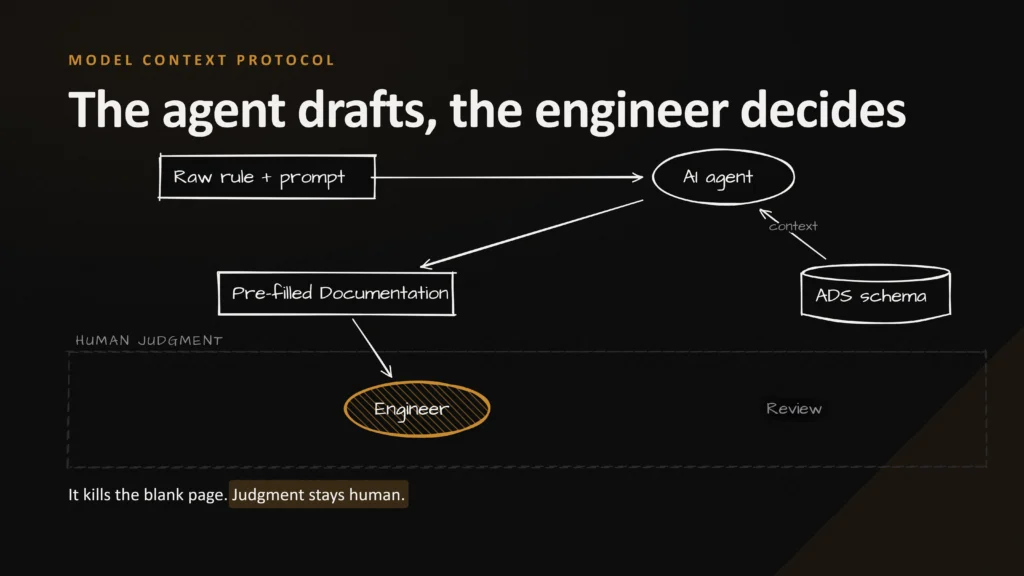
Teams are now wiring AI agents into this pipeline through MCP servers, APIs, or simple command-line tools:
- The agent reads the raw rule.
- It drafts Technical Context and Blind Spots from the ADS template.
- It asks you targeted questions to fill the remaining sections.
- A human reviews everything before the pull request merges.
The detection engineer keeps Priority and Response. The agent’s job is to eliminate the blank page that makes documentation the thing everyone skips.
- No more drift
Documentation and logic change together or not at all. - Enforced quality
Missing sections fail the build long before an analyst does. - Full history
Git shows who changed what, when, and why. - Portable logic
Sigma rules survive a SIEM migration. - Faster authoring
AI drafts the routine parts so engineers focus on judgment.
The framework, the CI gates, and the AI scaffolding can all sound like process for its own sake. Until you watch them collide with a real alert.
A 3 am Incident: Two Ways It Can Go
This scenario combines patterns I’ve seen in SOC work, built on the exact rule from our worked example.
Picture this: it’s a holiday weekend. An attacker has stolen the credentials for svc_dcstage, the account behind the IFM staging job. They log on to a domain controller over RDP and run one command.
ntdsutil "ac i ntds" "ifm" "create full C:\Windows\Temp\dump" q q
That’s an IFM snapshot of the entire Active Directory database, made with a native, signed Microsoft binary by an account that runs ntdsutil every quarter. The rule fires, and an alert lands in the queue.
What happens next depends entirely on what’s attached to that ticket.
Track A: No Documentation
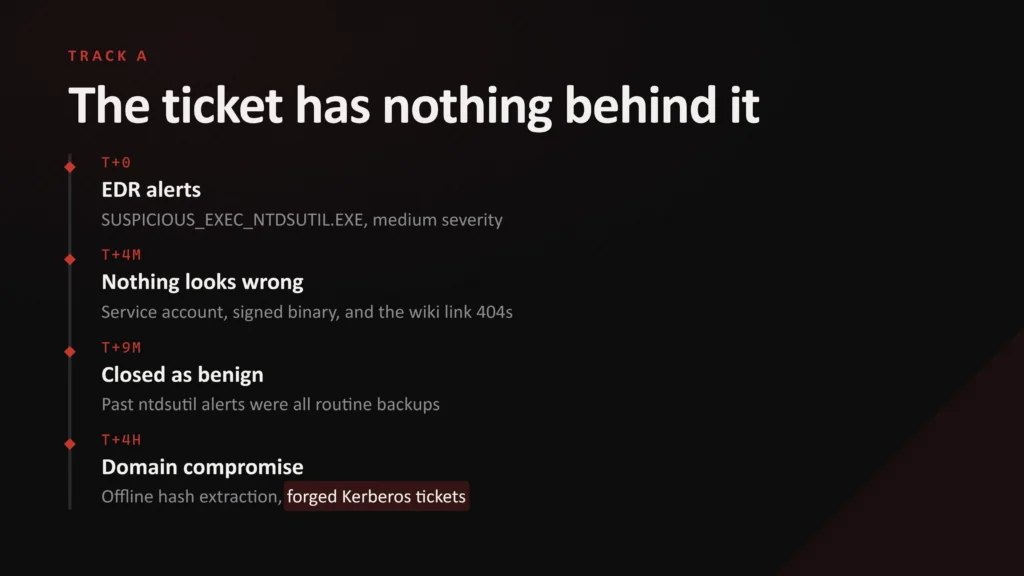
The analyst sees an alert titled Suspicious ntdsutil execution. They notice:
- A known service account
- A signed executable
- A wiki link that returns a 404
The ticket history shows past ntdsutil alerts for this account closed as routine staging jobs. Under pressure and with no counter evidence, the analyst closes this one as benign too.
Four hours later: offline hash extraction, forged Kerberos tickets, and full domain compromise.
Track B: The ADS is Attached
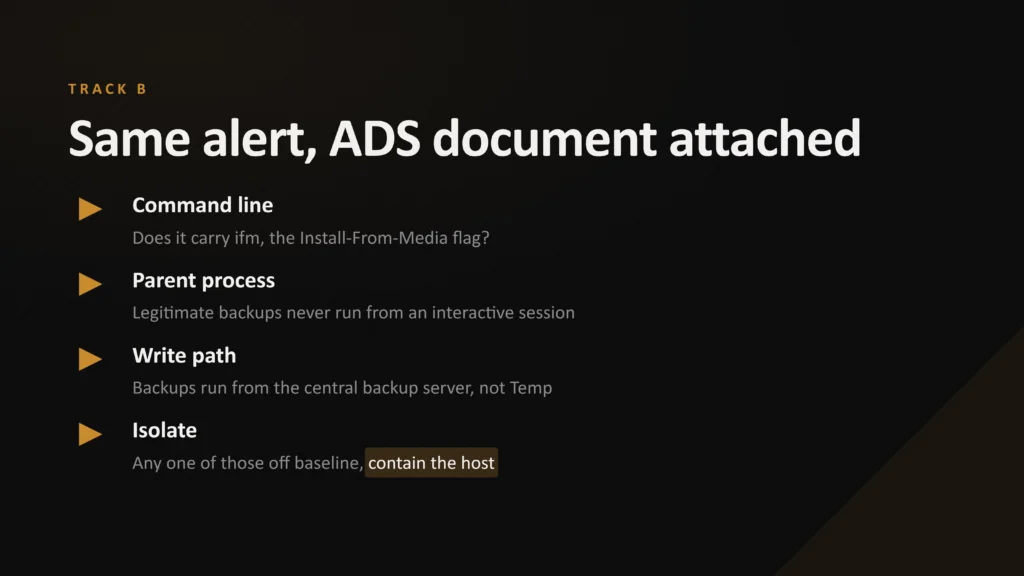
Same alert. This time it links straight to the ADS you saw above, and the analyst works through its Response steps:
- The command line contains ifm. The output path is
C:\Windows\Temp\dump. - The user is
svc_dcstage, but4624showslogon type 10(RDP), not4(batch), and the parent iscmd.exe, not the Task Scheduler service. Fail. - The output path is not
D:\IFMStaging. Fail. - Account disabled, host contained, incident escalated.
Twelve minutes from alert to containment. No domain compromise.
Same raw alert. Same analyst skill. The only variable was whether someone had written down, in advance, what benign looks like and how to investigate.
Why Attackers Love Undocumented Triage
This is why sophisticated actors increasingly live off the land with signed binaries and trusted accounts. Groups like Volt Typhoon have made it their signature. The joint government advisory AA24-038A describes them copying NTDS.dit off domain controllers with vssadmin and ntdsutil, launched through WMIC. Would your rule catch that exact command line? If you’re not sure, write it down as a blind spot.
Their bet is simple: your analyst runs out of time and context before the pattern registers.
Your Blind Spots section is how you counter that bet. Document evasions before an attacker uses them, such as renamed binaries, obfuscated command lines, or shadow copy theft that skips ntdsutil entirely. When the investigator already knows how to dodge a rule, the attacker loses the element of surprise.
How to Start Documenting Your Detection Rules This Week
None of this requires a new budget. Palantir gave the framework away for free. Here is a five-step plan you can start on Monday:
- Audit your last 10 deployed rules. Does each one have a written Goal at all? Count them. That number tells you how far your SOC is from Track B.
- Prioritize by risk. Start with rules that protect your most critical assets. A quick crown jewel analysis tells you which ones.
- Write Goal, Blind Spots, and False Positives first. These three give the biggest triage payoff. Use threat profiling to ground your blind spots in how real adversaries operate.
- Move rules and documentation into one repository. Then add the CI check above so a missing section fails the build.
- Link the ADS directly from the alert. If your analyst has to go hunting for the documentation, it might as well not exist.
An undocumented detection rule isn’t a defensive control. It’s a liability wearing one.
Conclusion
Garman had a handwritten list. Target had a top-severity alert and a label that said nothing.
This guide shows why detection-rule documentation determines which stories your SOC tells. You’ve seen documentation fall away as detection moved from Snort to SIEMs, and you’ve learned the 10 sections of Palantir’s ADS framework. You now have a complete ADS and Sigma rule to copy, plus a CI check that keeps documentation and logic in lockstep.
Most importantly, you’ve watched the same alert end in domain compromise on one track and containment in 12 minutes on the other.
Start with one rule. Write its Goal, Blind Spots, and False Positives today. Then do the next one. Good luck!




Frequently Asked Questions
What Is Detection Rule Documentation?
Detection rule documentation is the written context behind a detection rule: what behavior it detects, why it exists, what it assumes, what legitimate activity triggers it, and how to respond when it fires. Good documentation lets any analyst triage an alert quickly without needing the rule’s author.
What Is the ADS Framework?
The Alerting and Detection Strategy (ADS) framework is a documentation standard Palantir’s incident response team published in 2017. Its template has 10 sections: Goal, Categorization, Strategy Abstract, Technical Context, Blind Spots and Assumptions, False Positives, Validation, Priority, Response, and Additional Resources. Complete and peer-review every section before an alert goes to production.
Is There an ADS Template I Can Use?
Yes. Palantir publishes its template and examples on GitHub under an MIT license. You can also download the complete ntdsutil ADS from the template link in this article and replace the hosts, accounts, and paths with your own.
What Is the Difference Between Sigma and ADS?
Sigma is a vendor-neutral format for writing detection logic. ADS documents the strategy behind that logic. They work best together: the Sigma rule tells your SIEM what to match, and the ADS tells your analyst what the match means and what to do about it.
How Does Detection as Code Improve Documentation?
Detection as code stores rules and their documentation together in Git. Logic and documentation change in the same pull request, and automated CI checks fail the build if any ADS section is missing. This prevents documentation drift.
Which ADS Section Is Most Important?
Blind Spots and Assumptions is often the most valuable and the most skipped. It tells analysts what must be true for the rule to fire and how an attacker might evade it, turning guesswork into a structured check.
Can AI Write Detection Rule Documentation?
AI can draft sections like Technical Context and Blind Spots by reading the raw rule against the ADS template, removing the blank-page problem. A detection engineer should still review the output and make judgment calls on Priority and Response.